Feature Flags Behind a Proxy: HTTP Proxy vs ConfigCat Proxy


Feature flags need a way to receive configuration updates. In many setups, that means an outbound connection, but restricted networks can make that impossible.
If your backend sits behind a corporate proxy, outbound requests may need to pass through an authenticated gateway. In a locked-down VPC or air-gapped environment, direct internet access may be restricted or unavailable entirely. When the SDK cannot retrieve a usable configuration, it may continue using the last cached version or fall back to configured default values. Either way, the "flip a switch" experience starts looking a lot less dynamic.
There are two very different things people mean by "feature flags behind a proxy," and mixing them up costs a lot of time.
TL;DR
- An HTTP forward proxy is one that your traffic must pass through. The ConfigCat Proxy is a caching component you host yourself.
- For a corporate HTTP proxy, pass the proxy host, port, and credentials into your SDK's HTTP handler. Most ConfigCat SDKs have a setting for this.
- The ConfigCat Proxy is a small Go app you run in Docker. It caches config, can evaluate flags for your apps so clients never download raw config, keeps serving cached configuration if ConfigCat's CDN is temporarily unavailable, and scales horizontally.
What Does "Behind a Proxy" Actually Mean?
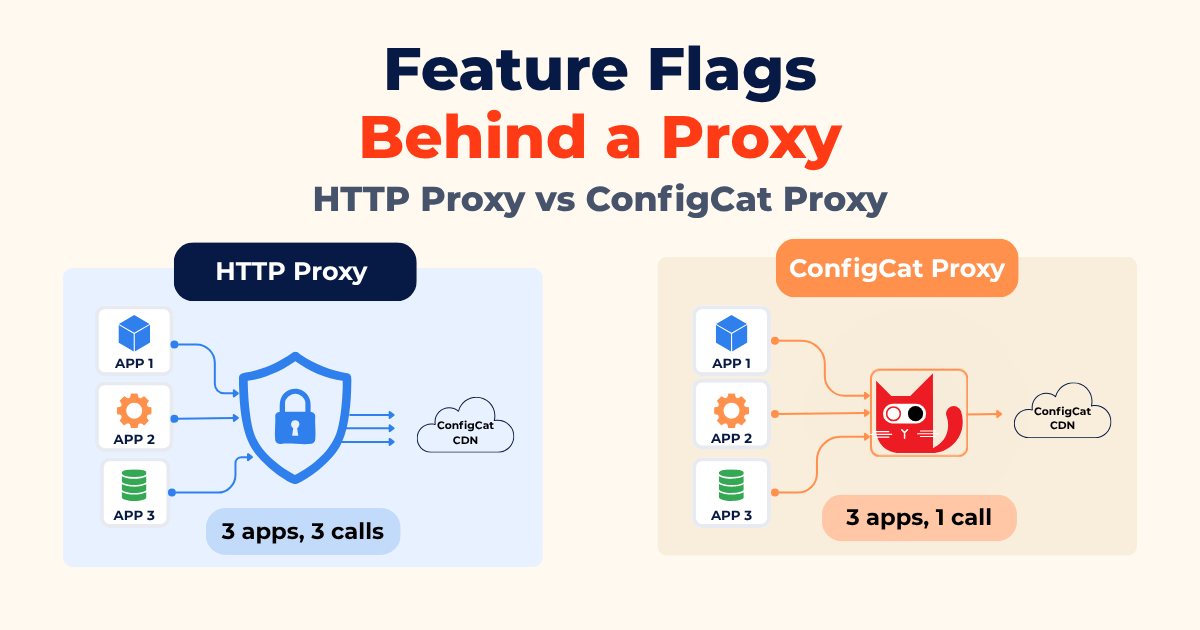
The word "proxy" can describe two completely different architectural roles. A corporate HTTP proxy is part of your network path: it sits between your app and the internet, and every outbound request has to go through it, often with authentication. The ConfigCat Proxy is a helper: you deploy it on purpose to cache config, cut down on outbound connections, and evaluate flags close to your apps.
The first controls how applications access resources outside the network. The second centralizes that access or, in offline mode, removes the need for an active internet connection entirely.
Top: each app makes its own trip out to ConfigCat. Bottom: only the Proxy does.
With a corporate HTTP proxy, each SDK fetches configuration independently. With the ConfigCat Proxy, configuration is fetched once and shared through the Proxy.
How Do You Route a Feature Flag SDK Through an HTTP Proxy?
Configure the proxy in the SDK itself, at client initialization. Depending on the SDK, you can either configure a proxy directly or customize the underlying HTTP client. Check the SDK reference for the exact option available in your language.
If you've ever seen this, you already know why you need it:
The remote server returned an error: (407) Proxy Authentication Required
That 407 response means the proxy is there, it wants credentials, and the SDK doesn't know about it yet. What you have to hand it is the proxy server, proxy port, proxy username, and proxy password, passed to the HTTP layer the SDK uses to reach ConfigCat's CDN.
In the .NET SDK, you build a WebProxy and assign it to the Proxy option:
var myProxySettings = new WebProxy(proxyHost, proxyPort)
{
    UseDefaultCredentials = false,
    Credentials = new NetworkCredential(proxyUserName, proxyPassword)
};

var client = ConfigCatClient.Get("#YOUR-SDK-KEY#", options =>
{
    options.Proxy = myProxySettings;
});
The exact hook differs by language, but the idea is the same: most ConfigCat SDKs expose either a proxy setting or a way to customize the underlying HTTP client. Check your SDK reference for proxy configuration options.
An HTTP proxy solved the network-routing problem, but it doesn't change the fact that every SDK instance may still retrieve configuration independently. If you have hundreds of Kubernetes pods, for example, each instance may establish its own outbound connection and fetch configuration separately.
That can work perfectly well, but it may not be the architecture you want at scale. And if the environment has no internet connectivity at all, an HTTP forward proxy can't solve that problem. Those are scenarios where the ConfigCat Proxy becomes useful.
What Is the ConfigCat Proxy?
The ConfigCat Proxy is a small Go application you run yourself that sits between your apps and ConfigCat's CDN, caching config JSON and serving it locally. Your SDKs connect to the Proxy instead of the public network. It picks up new flag data by polling or by a webhook call when you publish a change.
How does the Proxy receive configuration?
The Proxy runs in two modes, and this is the part that decides whether it fits your network:
- Online mode: the Proxy is the only component that fetches configuration from ConfigCat. Your applications communicate with the Proxy instead of connection directly to ConfigCat.
- Offline mode: the Proxy has no active connection to ConfigCat. It reads configuration from a shared cache or file that you synchronize into the environment yourself.
Offline mode is designed for environments without active access to ConfigCat, but configuration still needs to be transferred into that environment through a process you control. Your flag updates are therefore only as fast as that synchronization process.
Where are feature flags evaluated?
With local evaluation, your applications fetch configuration from the Proxy and evaluate flags themselves. With remote evaluation, your applications send evaluation requests to the Proxy and receive the evaluated result instead of downloading the raw configuration.
Remote evaluation is particularly useful when you don't want configuration data reaching clients or when you're working in a language without a native ConfigCat SDK. Both evaluation approaches can be used with the Proxy architecture depending on your setup.
OpenFeature and OFREP
The Proxy also supports the OpenFeature Remote Evaluation Protocol (OFREP), from Proxy v2.0.0 on. Any OFREP-compatible provider can use it for remote evaluation. That matters if you're standardizing on OpenFeature instead of vendor-specific SDKs.
baseUrlThe proxy setting changes how the SDK reaches its destination. The ConfigCat Proxy changes the destination itself. You point at it with baseUrl, and the SDK downloads config from your Proxy instead of ConfigCat's CDN.
Why Run Feature Flags Behind the ConfigCat Proxy?
The main reason to introduce the Proxy is to put configuration delivery behind a service you control. Depending on your architecture, that can give you several benefits:
- Fewer config JSON downloads. Config JSON downloads are metered on every ConfigCat plan. Without the Proxy, every SDK instance fetches its own copy. With it, one component fetches and everything else reads locally, so it's one download per SDK key and environment instead of one per instance.
- Faster flag reads. The Proxy serves cached config from memory, right next to your apps. Stateless workloads no longer fetch configuration directly from the ConfigCat CDN, which reduces startup latency and outbound traffic.
- A fallback when the CDN is unreachable. If ConfigCat's CDN is briefly unavailable, the Proxy keeps serving the last config it cached, so flags keep evaluating. This only helps if a cached version already exists.
- Room to grow. Run more copies of the Proxy behind a load balancer as demand rises, and give them a shared cache so any copy can answer any request.
- Config that never reaches your clients. With remote evaluation, frontend and mobile clients get finished results from the Proxy and never download raw config files.
- Real-time flag updates. When you use the Proxy's streaming capabilities, it can notify connected SDKs of feature flag changes through Server-Sent Events (SSE) or gRPC, instead of waiting for the next polling interval.
Two situations make the Proxy especially useful. Air-gapped environments, as described above, and on-premise deployments, where the config data has to stay inside your own infrastructure because compliance requires it.
How Do You Run the ConfigCat Proxy?
Start the container and give it an SDK key. That is the whole minimum setup:
docker run -d --name configcat-proxy \
  -p 8050:8050 -p 8051:8051 -p 50051:50051 \
  -e CONFIGCAT_SDKS='{"<sdk-identifier>":"<your-sdk-key>"}' \
  configcat/proxy
The <sdk-identifier> is a short name you choose. It shows up in the paths your apps call, like /api/{sdkId}/eval, so a single Proxy can serve several SDK keys at once. Of the three ports, 8050 serves config and evaluation requests, 8051 serves /status and Prometheus /metrics, and 50051 is gRPC.
On the SDK side, point baseUrl at the Proxy. Nothing else in your application changes.
Everything past that first run, offline mode, a shared cache backend, or TLS, goes in a YAML config file or in more CONFIGCAT_ environment variables. The ConfigCat Proxy docs cover both.
HTTP Proxy or ConfigCat Proxy: Which One Do You Need?
| Corporate HTTP proxy | ConfigCat Proxy | |
|---|---|---|
| What it is | A network appliance you route through | A component you deploy and own |
| You configure | SDK HTTP handler + credentials | SDK baseUrl + Proxy configuration |
| Solves | "My traffic must pass through the proxy" | Centralized caching, isolation, remote evaluation, air-gapped/offline scenarios |
| Internet needed | Yes, via the proxy | Only the Proxy in online mode; not required in offline mode |
| Effort | A few lines per service | A service to deploy and operate |
| What you take on | Nothing to run | Proxy operations, monitoring, upgrades, and optionally an external cache |
For a single service that only needs to get past a 407, the SDK settings are the whole answer. The ConfigCat Proxy is worth the extra work when you need scale, isolation, or data residency.
Plenty of teams end up using both: the ConfigCat Proxy for the architecture, configured to reach ConfigCat through a corporate HTTP proxy. The two layers stack cleanly.
When you're ready to run one, the ConfigCat Proxy docs have the full setup: installation, configuration, the endpoints your apps can call, and monitoring. The options worth reading first are offline mode, the cache backend, and how the Proxy learns which SDK keys to serve.
FAQ
Can I use feature flags in a fully offline, air-gapped network?
Yes, through the Proxy's offline mode. The part worth planning for is the refresh: nothing updates until you sync a new config in, so your flag changes are only as fast as the process you use to move files across the air gap. Decide who owns that job before you depend on it.
Do I still get real-time flag updates behind a proxy?
It depends which proxy. The ConfigCat Proxy supports streaming notifications through SSE and gRPC, so connected clients can receive flag-change notifications without waiting for their next polling interval. A plain corporate HTTP proxy has none, so the SDK keeps polling and your worst case delay is whatever poll interval you configured.
Does routing through a proxy change my application code?
Barely. One setting either way: proxy credentials in the SDK's HTTP handler, or baseUrl for the ConfigCat Proxy. Everything above that line is untouched.
Is the ConfigCat Proxy free to run?
The Proxy is open source and you host it yourself, so there is no license fee. The real trade is infrastructure for config JSON downloads: you pay to run a container, and in exchange fewer config JSON downloads count against your plan.
Want to try it on your own network? Sign up for a free ConfigCat account, grab an SDK key from the dashboard, and start with whichever of the two proxies your setup actually calls for.
Happy feature flagging! 🚀
For more on feature flags, check out other articles on the ConfigCat blog. You can also stay up to date with ConfigCat on Facebook, X, GitHub, LinkedIn, and the News & Product Updates page.