OpenFeature with ConfigCat: Feature Flags Without Vendor Lock-In


Feature flags help teams release software with more control. You can roll out features gradually, target specific users, run safer production releases, and turn risky functionality off without redeploying your application.
But once feature flags become part of your release workflow, another question comes up: should your application code depend directly on one feature flag vendor's SDK?
That is where OpenFeature can help.
In this guide, we'll look at what OpenFeature is, how it works with ConfigCat, and how to use the ConfigCat OpenFeature Provider for Node.js in a simple Express API.
What Is OpenFeature?
OpenFeature is an open specification that provides a unified API for evaluating feature flags, regardless of the feature flag vendor you choose.
Instead of calling a vendor SDK directly throughout your codebase, your application calls the OpenFeature SDK. Then, an OpenFeature provider connects those calls to your chosen feature flag management system.
For example, when you use OpenFeature with ConfigCat:
| Layer | Responsibility |
|---|---|
| OpenFeature SDK | Provides the standard feature flag evaluation API |
| ConfigCat OpenFeature Provider | Connects OpenFeature to ConfigCat |
| ConfigCat | Manages feature flags, targeting rules, environments, and values |
| Your application | Calls the OpenFeature client to get flag values |
OpenFeature does not replace ConfigCat. It standardizes how your application evaluates flags in code, while ConfigCat remains the place where you create, manage, target, and update those flags.
What OpenFeature Does and Does Not Do
This distinction is important. OpenFeature is not a feature flag dashboard. It is not where product managers create flags, update targeting rules, or review audit logs. It is a standard API layer for evaluating feature flags inside your application.
| OpenFeature helps you... | OpenFeature does not... |
|---|---|
| Standardize feature flag evaluation in code | Replace your feature flag management platform |
| Use SDKs and APIs for flag evaluation | Create or manage feature flags by itself |
| Connect to providers such as ConfigCat | Replace targeting rules, environments, permissions, or audit logs |
| Reduce code-level vendor lock-in | Remove all migration work |
| Use tools from the feature flagging ecosystem | Replace platform-specific management features |
In short: OpenFeature standardizes the code interface. ConfigCat manages the feature flags.
How Does OpenFeature Work with ConfigCat?
OpenFeature adds a vendor abstraction layer on top of your existing feature flagging setup. This is done through SDKs for evaluating feature flags. Feature flag vendors (or open source contributors) are then encouraged to develop OpenFeature providers to connect their SDKs to OpenFeature SDKs. In short, an OpenFeature provider is like a bridge between an app and a feature flag vendor.
ConfigCat offers OpenFeature providers for multiple platforms, including Node.js, JavaScript, React, Angular, Go, Java, Python, PHP, Ruby, Swift, .NET, and others. These providers let applications evaluate feature flags through the OpenFeature API while keeping feature management in ConfigCat.
The flow looks like this:
- You create and manage your feature flag in ConfigCat.
- Your application uses the OpenFeature SDK.
- The ConfigCat OpenFeature Provider connects OpenFeature to ConfigCat.
- Your application evaluates the flag through the OpenFeature API.
- ConfigCat returns the right value based on your targeting rules.
This gives you a standardized feature flag API in your code, while still using ConfigCat's dashboard, targeting rules, environments, permissions, and release controls.
Why Use OpenFeature?
OpenFeature is useful when you want a more standardized approach to feature flag evaluation.
Here are the main benefits.
Less code-level vendor lock-in
Different feature flag tools usually have different SDK methods, data structures, and implementation patterns. If you use those SDKs directly everywhere, switching providers later can require a lot of code changes.
OpenFeature reduces that coupling by giving your application a consistent feature flag API. This does not mean migrations become completely automatic. You may still need to recreate flags, targeting rules, environments, permissions, and workflows in the new platform. But at the code level, OpenFeature can make the transition easier.
A consistent API across teams and services
If your organization has multiple services, languages, or teams, OpenFeature can help standardize how everyone evaluates feature flags.
Instead of each team learning a different SDK style, they can work with the same OpenFeature concepts:
- providers
- clients
- evaluation context
- flag evaluation methods
- hooks
- events
This is especially useful in larger engineering teams or companies with polyglot architectures.
Access to the OpenFeature ecosystem
OpenFeature is part of the Cloud Native Computing Foundation (CNCF) ecosystem. The project was accepted into CNCF on June 17, 2022, and moved to the Incubating maturity level on November 21, 2023.
Because it is open and community-driven, teams can build shared tooling around feature flagging. For example, OpenFeature can work with observability-related concepts such as hooks, including OpenTelemetry-related use cases.
Easier experimentation with providers
OpenFeature can also be useful when evaluating feature flag platforms. Since your application talks to the OpenFeature API, you can test different providers with fewer changes to your business logic.
This can be useful if you are comparing vendors, migrating away from an in-house solution, or moving from another feature flag platform to ConfigCat.
When Should You Use OpenFeature?
OpenFeature is a good fit if:
- You want a vendor-agnostic feature flag API.
- You are migrating between feature flag providers.
- You want to standardize feature flag evaluation across multiple services.
- You work with several languages or frameworks.
- You want to reduce code-level coupling to one provider.
- You want to use tools from the OpenFeature ecosystem.
- You are building or replacing an in-house feature flag system.
It can also help if your team wants to keep the application code clean and consistent while still using a managed feature flag platform.
When Might You Not Need OpenFeature?
OpenFeature is helpful, but it is not always necessary. You may prefer using the ConfigCat SDK directly if:
- You are happy with one feature flag provider.
- You want the simplest possible setup.
- You do not need a vendor abstraction layer.
- Your team wants direct access to ConfigCat-specific SDK features.
- You are building a small project where portability is not a concern.
OpenFeature is most useful when portability and standardization matter. If your team wants the simplest possible setup or needs direct access to vendor-specific SDK features, using the native feature flag platform SDK may be the better fit.
OpenFeature Provider vs. Native ConfigCat SDK: What Is the Difference?
OpenFeature providers and native ConfigCat SDKs are not exactly the same, because they serve different purposes.
OpenFeature provides a standardized abstraction layer. It covers the common functionality shared across feature flag providers, which makes your application code more portable.
The native ConfigCat SDKs give you direct access to the full ConfigCat-specific feature set.
For basic use cases, such as evaluating on/off feature flags, OpenFeature works well. You can evaluate boolean flags, pass an evaluation context, and use ConfigCat targeting rules behind the scenes.
However, some advanced or ConfigCat-specific capabilities are not exposed directly through the OpenFeature API. Examples include:
getAllKeys- ConfigCat-specific hooks
- snapshots
- online/offline mode
The ConfigCat OpenFeature provider also exposes the underlying ConfigCat client through a configCatClient property. This means you can still access ConfigCat-specific functionality when needed.
The trade-off is portability. The more your application relies on ConfigCat-specific methods through the underlying client, the less vendor-agnostic your OpenFeature integration becomes.
| Use OpenFeature when... | Use the native ConfigCat SDK when... |
|---|---|
| You want a standard feature flag API | You want full access to ConfigCat SDK features |
| You mainly evaluate flags | You need ConfigCat-specific methods |
| You want portability across providers | You are fully committed to ConfigCat |
| Your use case is simple on/off flags or targeting | You need advanced SDK behavior such as snapshots or online/offline mode |
A good rule of thumb: use OpenFeature when standardization and portability matter. Use the native ConfigCat SDK when you want the full ConfigCat SDK feature set with fewer abstraction limits.
Demo: Use OpenFeature with ConfigCat in Node.js
Let's build a simple Node.js API using Express that returns a filtered list of AI models based on the user sent in the request.
cURL http://localhost:3000/models -H "x-user-email: [email protected]" | jq

[
  {
    "name": "GPT 3.5 Turbo",
    "type": "standard"
  },
  {
    "name": "Claude Haiku",
    "type": "standard"
  },
  {
    "name": "Llama 2 7B",
    "type": "standard"
  },
  {
    "name": "GPT-4o",
    "type": "pro"
  },
  {
    "name": "Claude Sonnet 3.5",
    "type": "pro"
  },
  {
    "name": "Llama 3.1 405B",
    "type": "pro"
  }
]
I'll show you how to use OpenFeature's standardized evaluation context when evaluating a feature flag. This is useful for targeting users based on attributes such as name, email, and country. For example, showing users with an @whisker.co email address a list of pro-AI models, while others see standard AI models.
An evaluation context according to OpenFeature's specification is a container for arbitrary contextual data that can be used as a basis for feature flag evaluation. In ConfigCat, this translates to the User Object.
Step 1: Create a Feature Flag in ConfigCat
-
Sign in to ConfigCat, or sign up if you don't have an account.
-
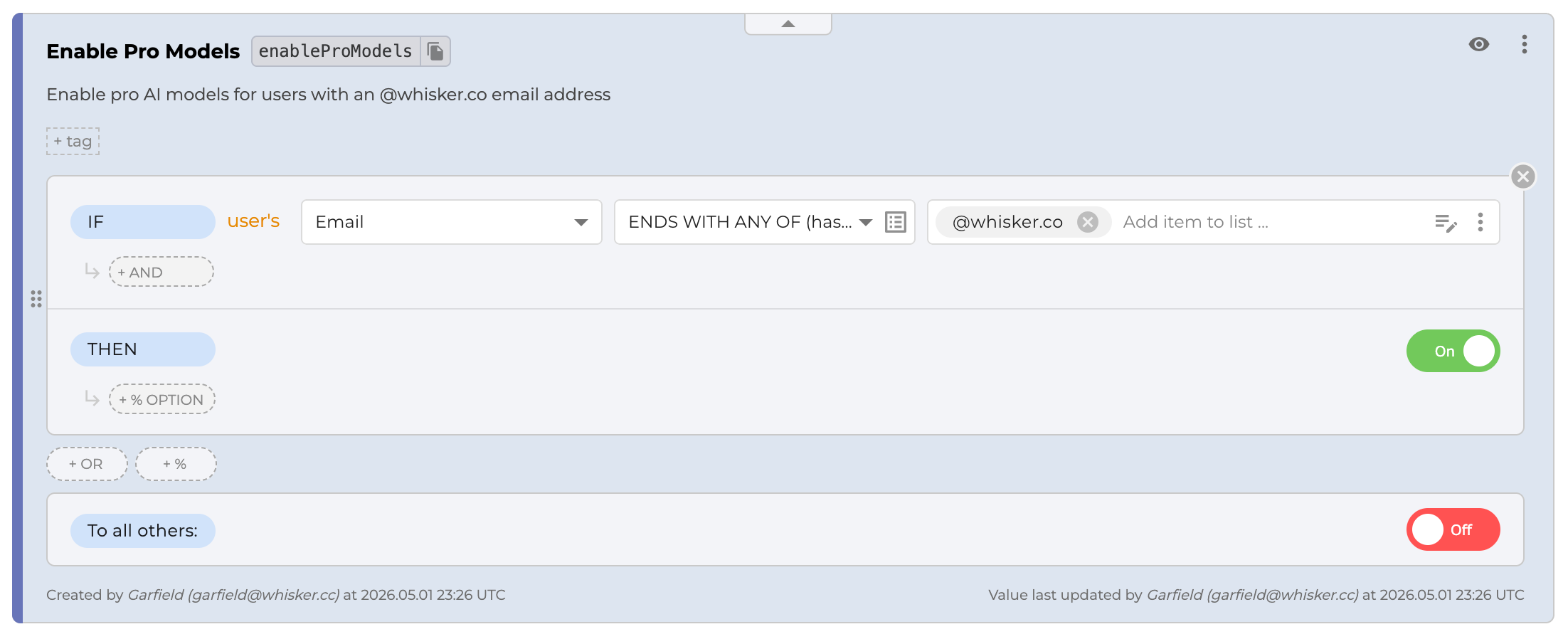
Create a feature flag with the following details.
- Name: Enable Pro Models
- Key:
enableProModels - Hint: Enable pro AI models for users with an @whisker.co email address
-
Click
+ IF, then clickTarget users.You'll see two sections: an
IFsection for configuring the condition and aTHENsection for setting the feature flag's value based on the condition. -
In the
IFsection, selectEmailas the comparison attribute, then selectENDS WITH ANY OF (hashed)as the comparator. -
Enter
@whisker.coin the field next to the comparator, then turn on the feature flag in theTHENsection below. ClickSAVE & PUBLISH CHANGES.
Now that we've configured the feature flag, let's move on to the code.
Step 2: Install ConfigCat and OpenFeature
Prerequisites
- Node.js v18+
- Basic understanding of Node.js and Express
To use ConfigCat and OpenFeature together, we'll need to install ConfigCat's OpenFeature Provider for Node.js. ConfigCat's Node SDK and OpenFeature's Server SDK will be automatically downloaded alongside the provider.
- Open your terminal, create a new directory, and install the provider.
mkdir configcat-openfeature-nodejs
npm init -y
npm install express
touch index.js
npm i @openfeature/config-cat-provider
- Import the provider and OpenFeature server SDK in
index.js.
import { ConfigCatProvider } from '@openfeature/config-cat-provider';
import { OpenFeature } from '@openfeature/server-sdk';
- Create the ConfigCat provider with your ConfigCat SDK key. Then, set the provider and create an OpenFeature client.
// Create a provider with your SDK key
const provider = ConfigCatProvider.create('YOUR-CONFIGCAT-SDK-KEY');

// Initialize the provider
OpenFeature.setProviderAndWait(provider);

// Create a client.
const client = OpenFeature.getClient();
ConfigCatProvider.create creates a ConfigCat client with the specific SDK key. The setProviderAndWait method sets ConfigCat as the source of feature flag values and ensures the provider is ready before we begin using it. Finally, OpenFeature.getClient creates a client that uses the set provider to evaluate feature flags.
Step 3: Create the API Endpoint
I'll create a /models endpoint that returns a list of AI models. Depending on the email address supplied in the request header, we'll return a list of pro-AI models if the flag evaluates to true and the standard list otherwise.
app.get('/models', async (req, res) => {
 const email = req.headers['x-user-email'];

 if (!email) {
  return res.status(400).json({ message: 'Email required' });
 }

 const context = {
  targetingKey: 1, // required
  email: email,
 };
 let modelsListEnabled = await client.getBooleanValue(
  'enableProModels',
  false,
  context,
 );

 if (modelsListEnabled) {
  const proModels = db.getModels('pro');
  console.log('Returning pro models...');
  res.json(proModels);
 } else {
  const standardModels = db.getModels('standard');
  console.log('Returning standard models...');
  res.json(standardModels);
 }
});
The context object stores a unique targeting key and the user's email. To evaluate the flag using OpenFeature, I passed the flag key, a default value, and the context. As stated earlier, the ConfigCat Node.js provider automatically transforms context into a ConfigCat User object, which ConfigCat will use to determine whether the user's email matches the condition set in the targeting rule.
Finally, I added a condition to return the appropriate list of models based on the feature flag's value. Let's see if it works.
When a user is supplied with an email address like: [email protected] the response would be:
cURL http://localhost:3000/models -H "x-user-email: [email protected]" | jq

[
  {
    "name": "GPT-4o",
    "type": "pro"
  },
  {
    "name": "Claude Sonnet 3.5",
    "type": "pro"
  },
  {
    "name": "Llama 3.1 405B",
    "type": "pro"
  }
]
Why Use ConfigCat with OpenFeature?
OpenFeature gives you a standardized evaluation API. ConfigCat gives you the feature flag management layer behind it.
Together, they give you vendor-agnostic feature flag evaluation in code without giving up a managed dashboard, targeting rules, environments, permissions, and release controls.
Recap
OpenFeature is useful when you want a standardized, vendor-agnostic way to evaluate feature flags in your application code. ConfigCat provides the feature flag management layer behind it, including targeting rules, environments, values, and release controls.
In this guide, we covered:
- what OpenFeature is
- what OpenFeature does and does not do
- how OpenFeature works with ConfigCat
- when OpenFeature is useful
- how OpenFeature providers differ from native ConfigCat SDKs
- how to use the ConfigCat OpenFeature Provider for Node.js
OpenFeature is a good fit when portability and standardization matter. If you want the simplest direct integration or need ConfigCat-specific SDK features, the native ConfigCat SDK may be the better choice.
Next Steps
To explore the broader OpenFeature ecosystem, visit OpenFeature.dev or join the OpenFeature Slack channel to get the latest updates.
If you want to try feature flags with ConfigCat, you can start with the Forever Free plan and connect your first flag through OpenFeature or a native ConfigCat SDK.
For more on feature flags, check out ConfigCat on Facebook, X, GitHub, and LinkedIn.