Introducing Sensitive Text Comparators
· 2 min read

Focusing on frontend applications, we introduced sensitive text comparators to make sure sensitive info (like email address, username) is kept hidden in targeting rules.
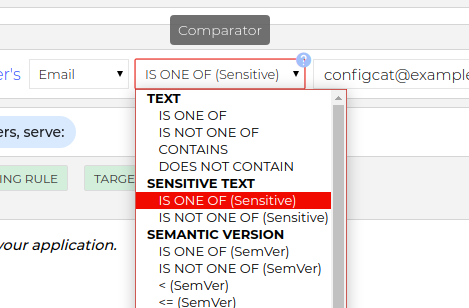
How it works
In this case the feature flag evaluation is based on the secure hashes of the comparison values.
Comparison values in config_v3.json:
config_v4.json:
"c": "75ca15b98f2422cfbae01c76eaf0cacb8fe1d44e,ff672c127d393f7e9589ffa2efd1bb4a702ff237",
Since sensitive text comparators don't support CONTAINS or DOES NOT CONTAIN comparisons, here is an example how to target users from the same company. Which used to be handled by a rule like:

You can add a custom attribute called domain and use only sensitive comparators in the targeting rule.
On the Dashboard:

In your code:
const userDomain = userEmail.split('@').pop();
const userObject = {
  identifier: '<SOME USER ID>',
  email: userEmail,
  custom: { domain: userDomain },
};
const value = configCatClient.getValue(key, defaultValue, callback, userObject);
Supported SDKs
Sensitive comparators are supported from the following SDK versions:
| SDK | Version |
|---|---|
| JS | v3.0.0 |
| Node | v4.0.0 |
| PHP | v3.0.2 |
| Python | v3.0.2 |
| Ruby | v2.0.3 |
| Go | v4.0.2 |
| Java | v4.0.1 |
| Android | v4.0.0 |
| .NET | v4.0.0 |
| Swift | v4.0.0 |