Approval Flow & Scheduled Changes
A change request is a set of feature flag changes that you prepare on ConfigCat Dashboard without publishing them right away. You can propose changes for later manual publishing, or schedule it to be applied automatically at a specific time. This supports the four-eyes principle, because another person can review and approve the change before it reaches production.
Typical use cases:
- Approval before publishing: You work in a regulated environment where a colleague must review every change before it reaches production.
- Draft and collaborate: You want to prepare changes, collect feedback in comments, and only publish when the team agrees.
- Scheduled release: You want a feature turned on next Monday at 9 AM without being at your desk.
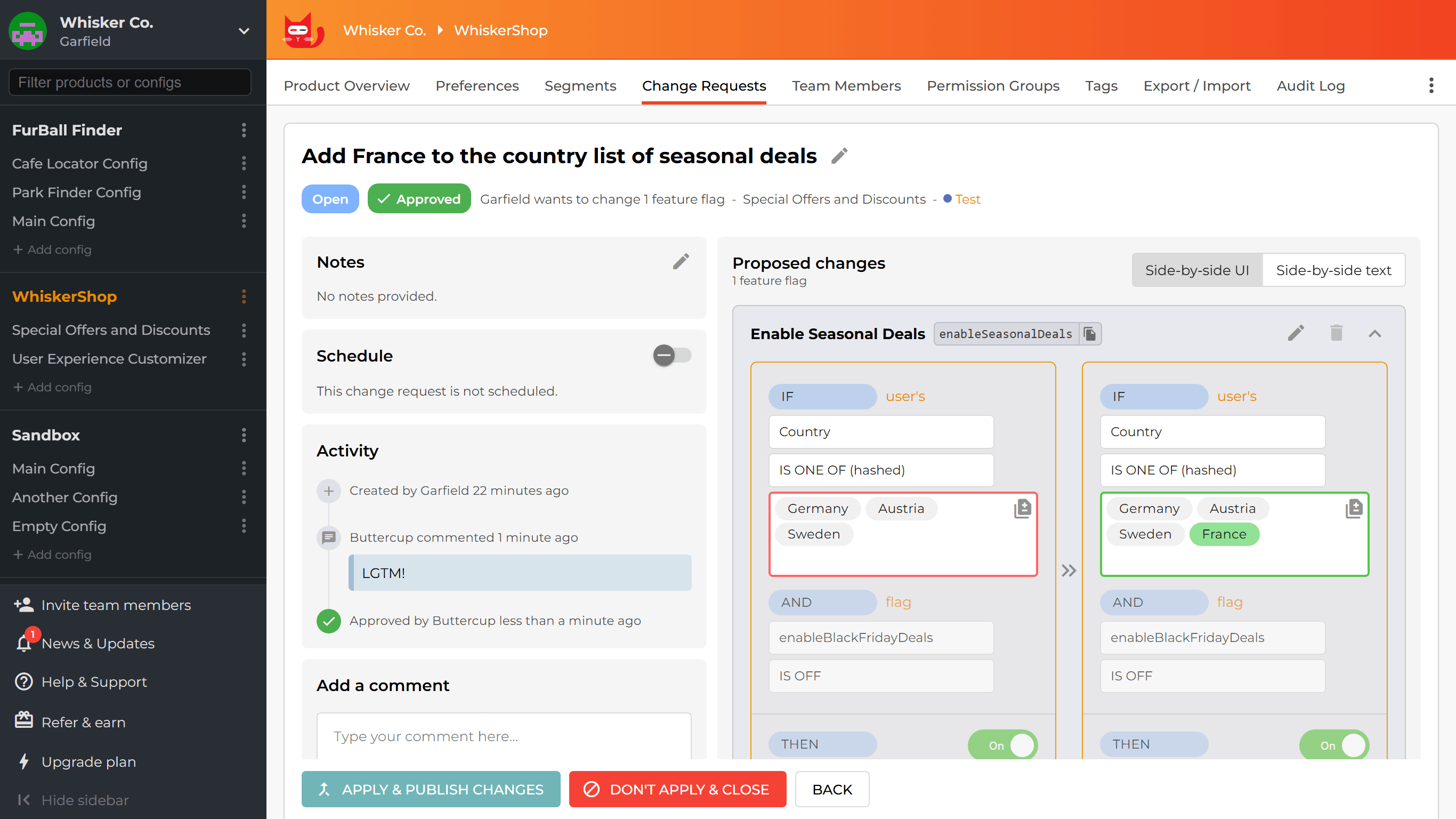
How does it work?
Feature flag changes in ConfigCat can be:
- Published immediately: The classic way. The change takes effect right away.
- Proposed: Saved as a change request for later manual publishing.
- Scheduled: Saved as a change request that ConfigCat applies automatically at a selected date and time.
If an environment is configured as approval-required, changes cannot be applied immediately. A change request must be opened, reviewed, and approved by another member before it can be published.
This also applies to scheduled changes: a scheduled change request is only applied on schedule if it has been approved.
Permissions
Who can create change requests?
Only members who have Read/Write permission for feature management in the target environment may propose or schedule changes.
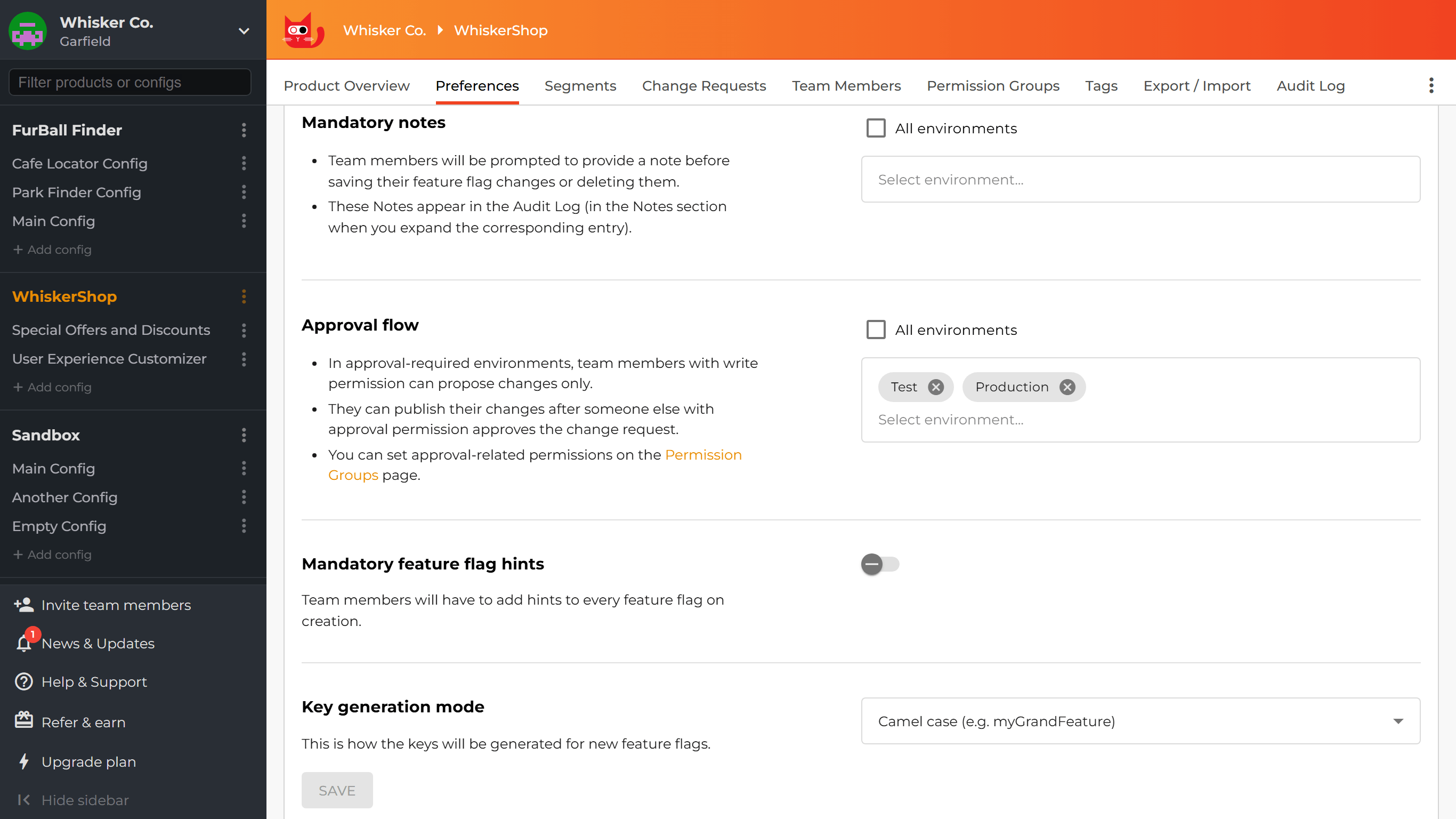
How to require approval for environments?
The Approval Flow product preferences control which environments require approval.
You can enable it for the entire product or for specific environments.
When an environment is approval-required, feature flag changes must first be proposed as a change request and then go through the approval flow. This process can be skipped only by members with Can bypass approval permission, described below.
How to manage permissions for approval flow?
Permission groups include a Change request approval permission, which can be set to one of the following values:
- Cannot approve: The member cannot approve change requests.
- Can approve others: The member can approve change requests opened by other members.
- Can bypass approval: The member can approve change requests opened by other members, or apply changes directly without going through the approval flow.
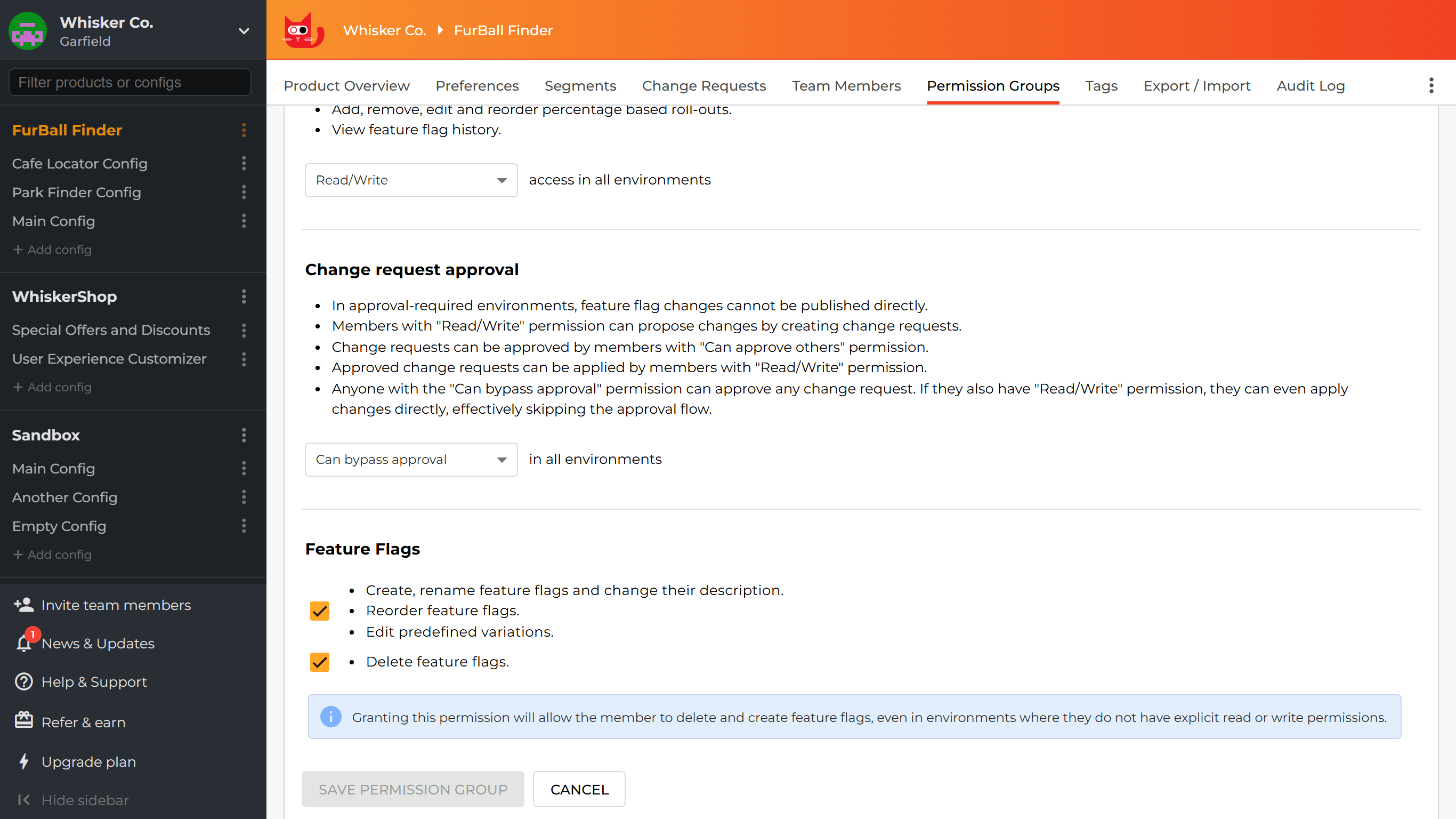
This permission can be set product-wide or specified per environment.
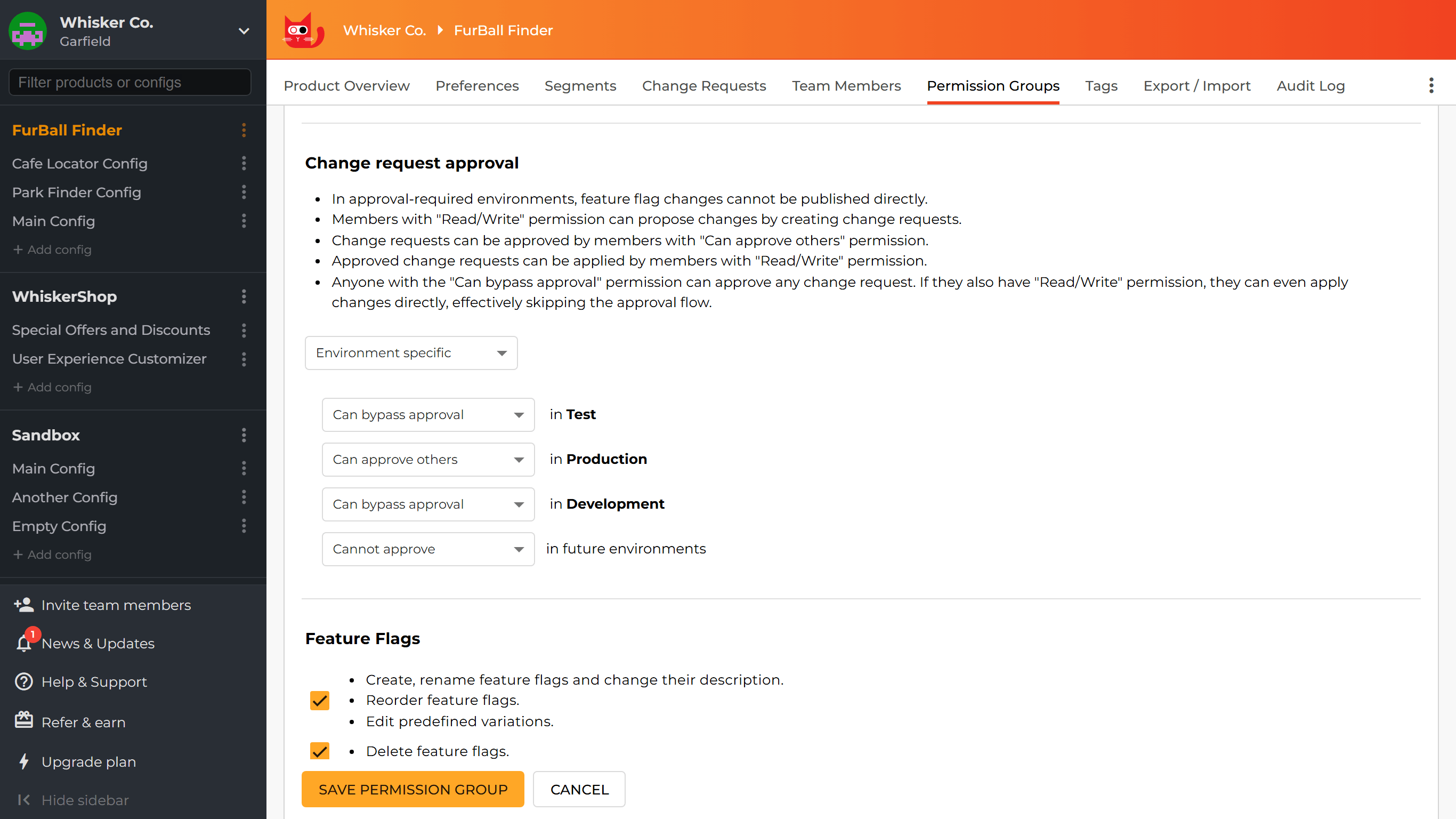
In approval-required environments:
- Members with Read/Write permission can create change requests to propose or schedule changes.
- Members with Can approve others permission (or above) can approve change requests.
- Members with Read/Write permission can apply an approved change request.
- Anyone with the Can bypass approval permission can approve any change request. If they also have Read/Write permission, they can even apply changes directly, effectively skipping the approval flow.
- Members with Can approve others permission (or above) can close any change request.
The Can bypass approval permission is intended for emergency situations. By default, both proposed and scheduled changes are expected to go through the approval flow. Bypassing approval always requires an explicit action by the user. It is never automatic.
For scheduled change requests, a member with Can bypass approval permission can choose to apply the change request on schedule without prior approval. However, they must opt in to this behavior per change request.
Scheduled changes
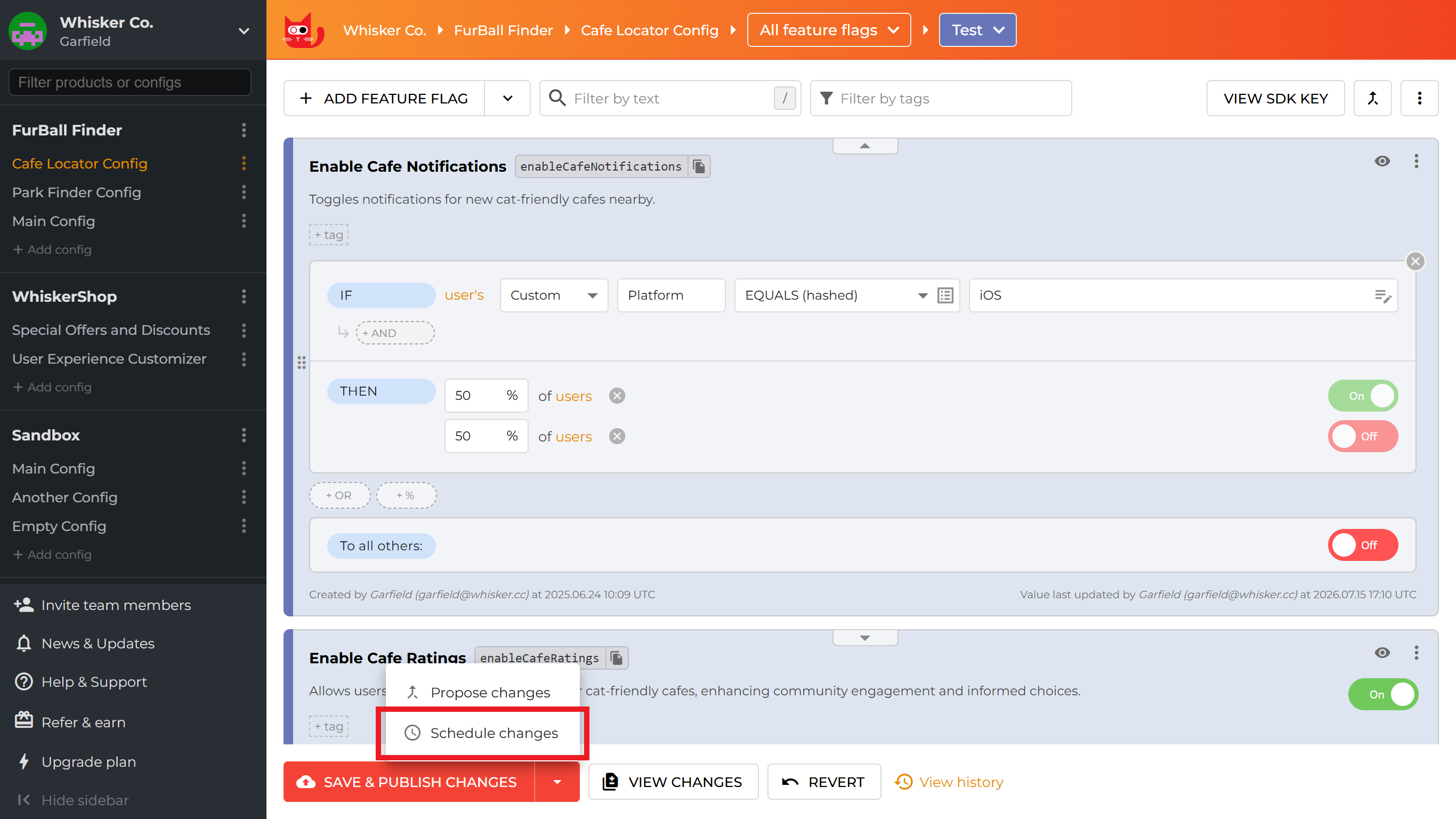
A change request can be scheduled to apply the proposed changes automatically at a selected date and time. You can create a scheduled change request by clicking the down arrow next to the Save & publish changes or Propose changes button and selecting Schedule changes.
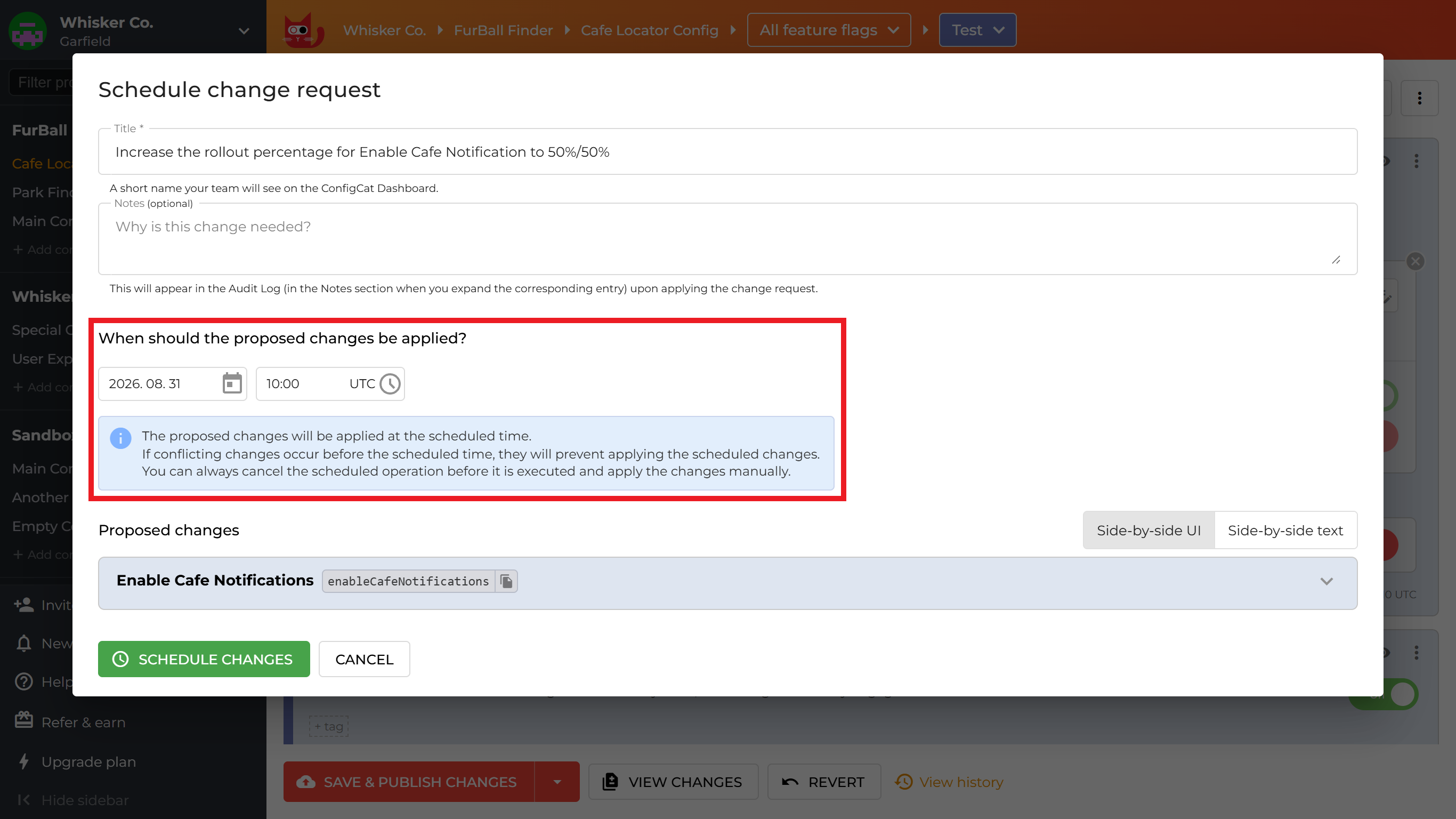
In the Schedule change request dialog, you can set when the proposed changes should be applied. A non-scheduled change request can also be converted into a scheduled one later, and a scheduled request can be unscheduled at any time, reverting it to a normal, non-scheduled change request.
In approval-required environments, a scheduled change request is only applied if it is approved before the scheduled time. If approval is pending, or the change request is otherwise blocked, ConfigCat will not apply it at the planned time.
Failed to apply on schedule
If a scheduled change request cannot be applied at the planned time (for example, because it was never approved), scheduling is disabled and the change request is reverted to a regular open change request. You can then resolve the issue and apply it manually or schedule it again.
Lifecycle of a change request
Ownership and editing
Only the owner can edit a change request. Other members can:
- comment on the change request,
- approve it if they have the appropriate permission,
- close it if they have Can approve others permission,
- apply it if they have Read/Write permission and the change request is approved or doesn't require approval.
Comments, notifications, and activity
Change requests allow comments for team discussion. Email notifications are sent on important events, such as approvals, comments, and status changes. The activity log records everything that happens on the change request.
Re-approval after edits
If the owner edits a change request, for example, by updating the proposed changes or schedule, the existing approval is removed. The request must be reviewed and approved again before it can be applied.
Statuses
- Open: The change request has been created and is waiting to be applied.
- Applied: The change request has been applied, meaning that the proposed changes have been published.
- Closed: The change request has been closed without being applied. Closed change requests cannot be reopened.
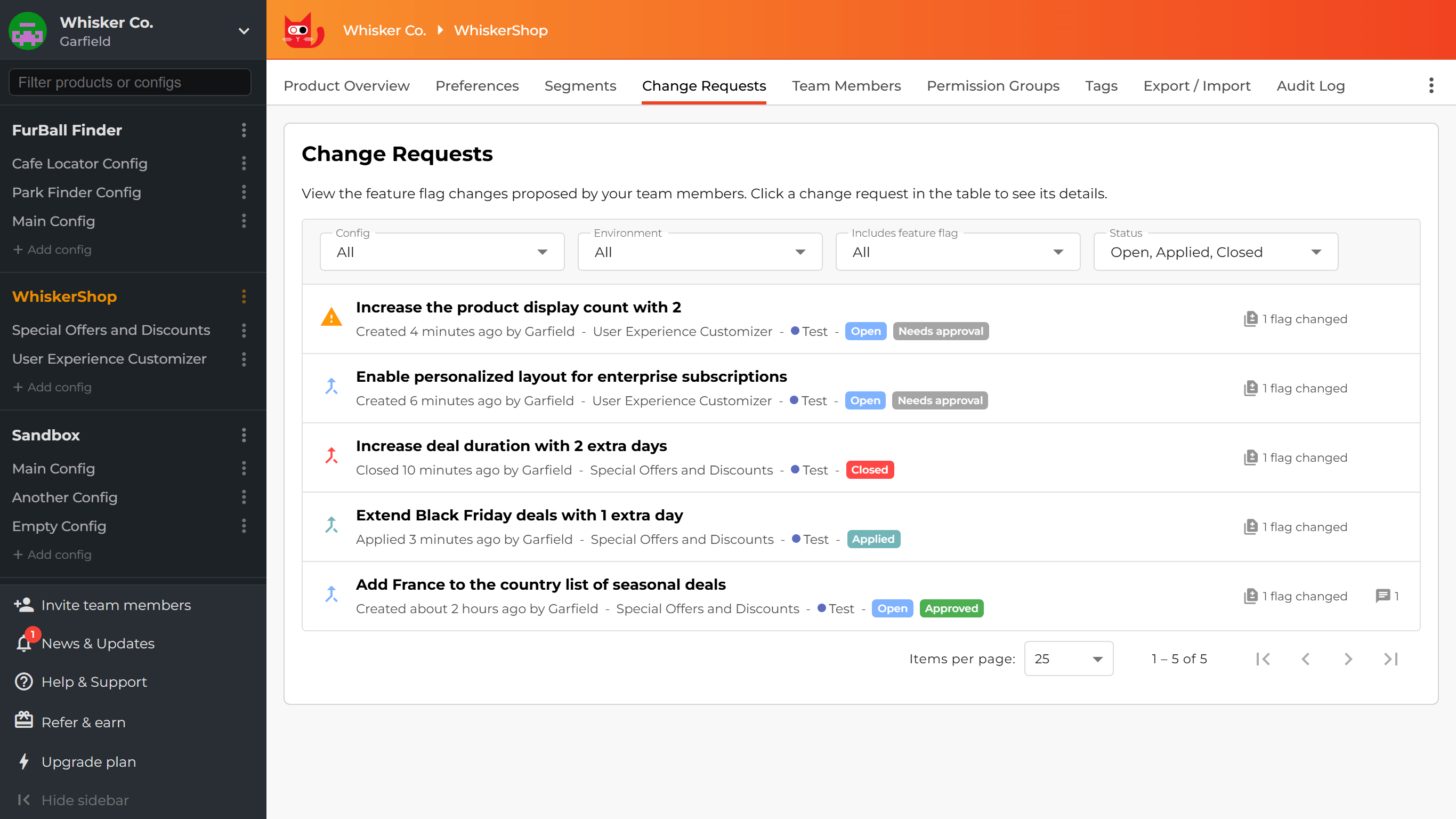
Needs approval
A change request is labeled as Needs approval when it is in an approval-required environment and has not yet been approved.
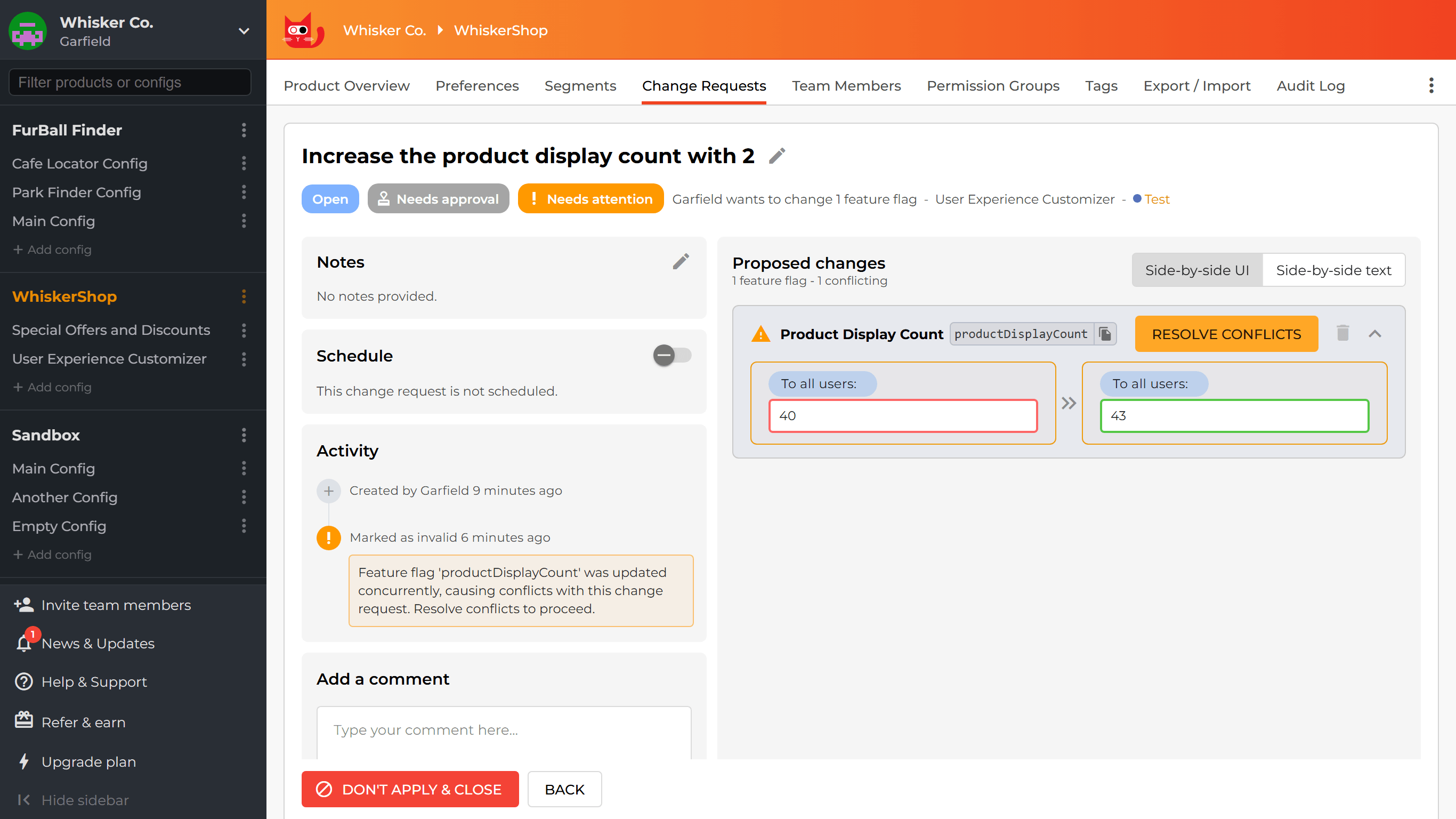
Needs attention
A change request is labeled as Needs attention when there is a blocking issue that prevents it from being applied, either manually or on schedule. The issue must be resolved before the change request can move forward.
Possible causes:
- Conflicting changes: Changes to the included feature flags were published concurrently after the change request was opened. See Conflict handling.
- Owner is unavailable: The change request owner left the organization or lost Read/Write permission in the target environment. Another eligible member must claim the change request.
- Missing mandatory notes: Notes became mandatory in the target environment after the change request was created, but no notes were provided.
- Circular dependency: Changes to the included feature flags were published concurrently after the change request was opened, and applying the change request now would create a circular dependency through prerequisite flags.
Conflict handling
When you create a change request, ConfigCat warns you if another open change request in the target environment already includes the same feature flags.
This is important because when two change requests modify the same feature flag, applying one will mark the other as invalid. Such a change request cannot be applied until its conflicts are resolved.
The Resolve conflicts dialog shows the changes your change request proposes and the changes that were published concurrently after you created it (or after you last resolved its conflicts).
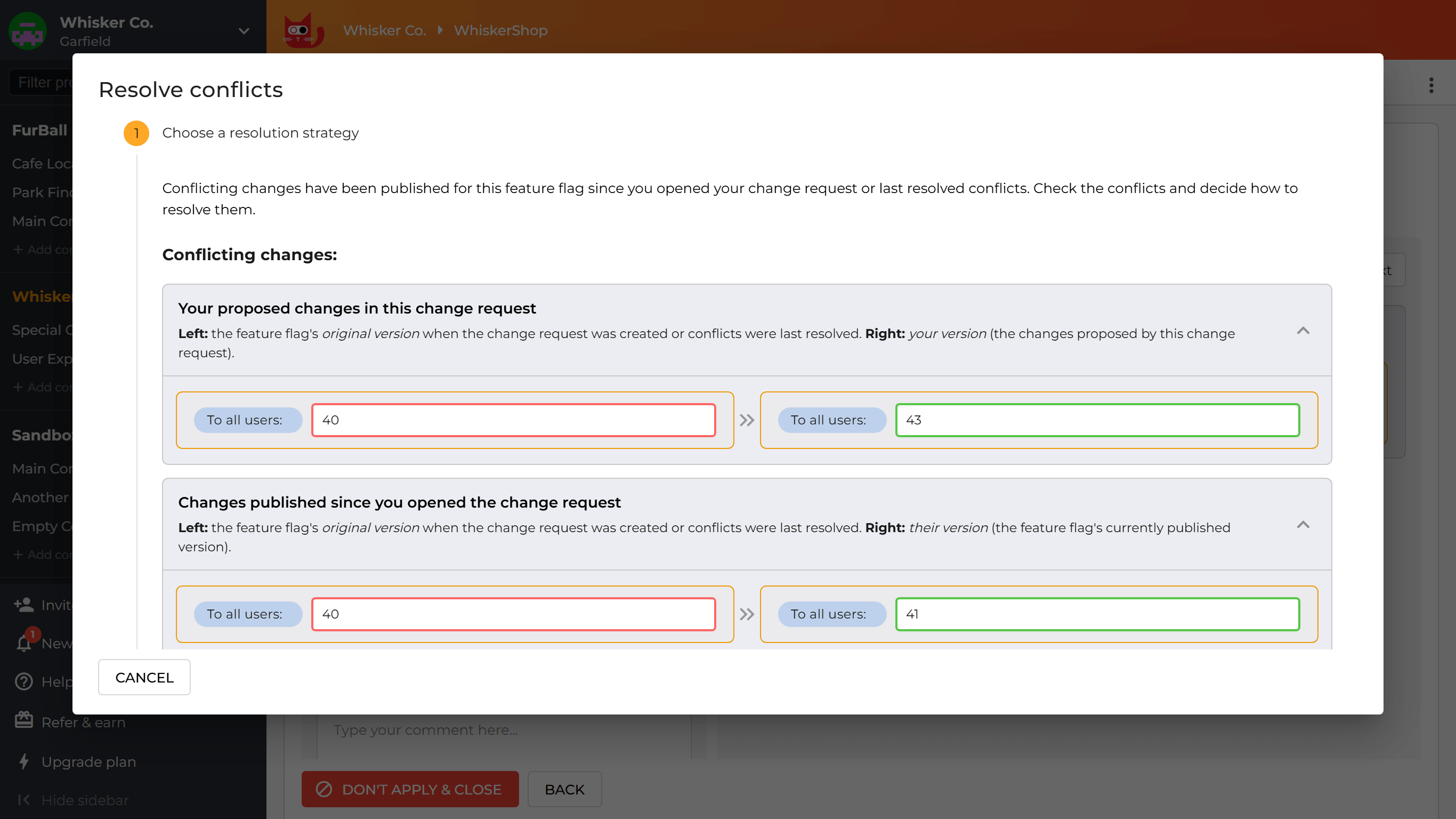
You can resolve conflicts in one of these ways:
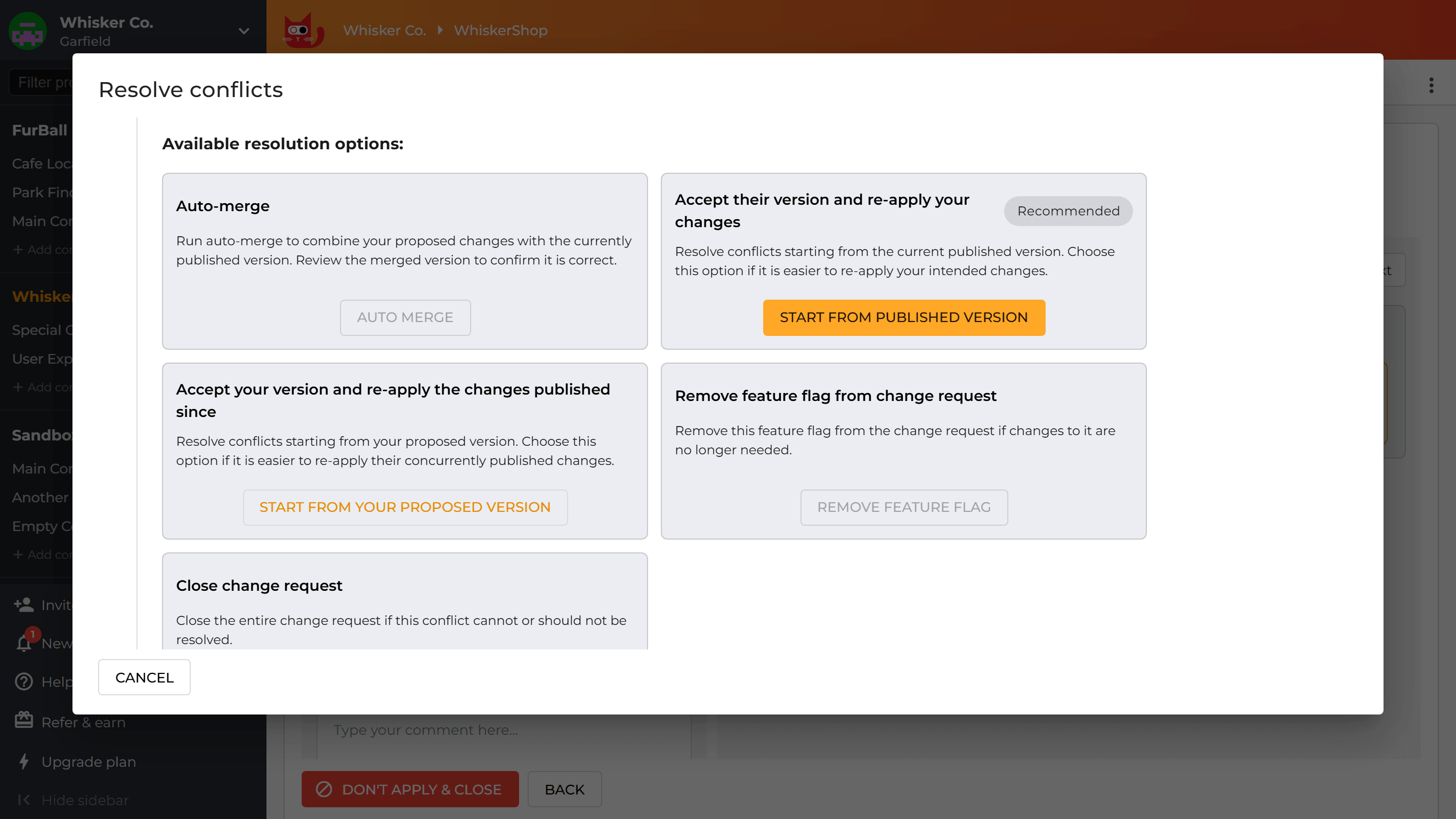
Auto-merge
This option automatically merges your proposed version with the currently published version. It is only available when the system can merge the changes safely.
Always review the merged result before applying it to ensure it produces the intended behavior.
Accept their version and re-apply your changes
This option allows you to resolve conflicts starting from the current published version. Choose this if it is easier to re-apply your intended changes. This is the recommended option when Auto-merge is not available.
Accept your version and re-apply the changes published since
This option allows you to resolve conflicts starting from your proposed version. Choose this if it is easier to re-apply the concurrently published changes.
Remove feature flag from change request
This option removes the feature flag from the change request and discards its changes. This option is only available when the change request includes more than one feature flag.
Close change request
This option closes the entire change request. Choose this when the conflict cannot or should not be resolved at all.
Limitations
The approval flow currently applies to feature flag changes only. The following actions do not require a change request or approval:
- The features are only available for V2 configs and are not supported for V1 configs. See the Config V2 Migration Guide.
- Creating or deleting a feature flag.
- Changes to predefined variations.
- Changes to segments.
Restrictions
- Feature flags cannot be deleted if they are referenced by an open change request (even if referenced indirectly, as prerequisites).
- Predefined variations cannot be removed if the feature flag is referenced by an open change request.
- Segments cannot be removed if they are used in a feature flag referenced by an open change request.