How to Implement a Canary Release with Feature Flags (Step-by-Step Guide)


When shipping new features, releasing them to all users at once can be risky. Even small bugs can affect thousands of users immediately. That's why modern teams rely on canary releases and feature flags to roll out changes gradually, monitor real-world performance, and reduce the risk of failure.
In this guide, you'll learn:
- What a canary release is
- How it works with feature flags
- A step-by-step rollout strategy using ConfigCat
- Best practices and common mistakes to avoid
What Is a Canary Release?
A canary release (also called a canary deployment) is a strategy where a new feature is introduced to a small subset of users before being rolled out to everyone. Instead of releasing a feature globally, the rollout happens in controlled stages.
Example rollout strategy:
Team members → Beta users → 1% of users → 5% of users → All users
This incremental approach helps teams:
- Limit the impact of potential issues
- Test features with real users
- Gather early feedback
- Roll back quickly if something goes wrong
Feature flags make this strategy even easier because they allow teams to control feature visibility without redeploying code. If you're new to this concept, our guide on feature flags and how they work explains the fundamentals and common use cases.
Why Is It Called a Canary Release?
The term comes from coal mining, where miners used canaries to detect toxic gases. If the canary was affected, it warned miners of danger.
In software, early users act as the "canary", helping detect issues before a full rollout.
When Should You Use a Canary Release?
Canary releases are especially useful when:
- You're shipping high-risk or critical features
- You want to test changes in a real production environment
- Performance or scalability is a concern
- You have a large user base and want to reduce rollout risk
For example, in microservices architecture, canary releases help isolate failures without impacting the entire system.
Benefits of Canary Releases
A well-executed canary rollout helps teams:
- Catch bugs in real-world conditions
- Monitor performance under gradual load
- Ship features with more confidence
- Roll back quickly if issues appear
- Build confidence before a full rollout
Challenges to Be Aware Of
Canary releases aren't without tradeoffs. Depending on your setup, you may need to handle:
- Multiple versions of your application
- Increased infrastructure complexity
- Database compatibility between versions
- Additional monitoring requirements
This is why many teams rely on feature flag platforms to simplify rollout logic.
Canary Release vs A/B Testing
These concepts are often confused but serve different purposes:
- Canary releases: detect bugs, regressions, and performance issues
- A/B testing: test product ideas and user behavior
Canary rollouts typically complete in minutes or hours, while A/B tests may run for days to reach statistical significance.
How Feature Flags Simplify Canary Releases
Feature flags (also called feature toggles) give you direct control over how features are exposed without redeploying your application.
Instead of relying on infrastructure-heavy solutions like traffic routing or load balancers, you can manage rollouts directly in your code and dashboard.
With feature flags, you can:
- Release a feature to a specific group of users
- Roll out changes gradually using percentages
- Turn features off instantly if needed
This approach fits into progressive delivery, where features are released in controlled steps instead of all at once.
Platforms like ConfigCat make this even easier by letting you define targeting rules and rollout percentages without modifying your codebase.
How to Choose Canary Users
Before starting a rollout, decide who should see the feature first.
Common strategies include:
- Internal team members (developers, QA)
- Beta testers or early adopters
- A random percentage of users
- Specific regions or countries
- Low-risk or non-critical users
Choosing the right users helps reduce risk and gather meaningful feedback early.
A Simple Canary Release with ConfigCat
Let's look at how a basic rollout might work in practice.
In this example, we assume you've already:
- Logged into the ConfigCat dashboard
- Created a feature flag
- Integrated the ConfigCat SDK into your application
Our feature flag will be called:
facebook_sharing_enabled
Initially, the feature is turned off for everyone.
Step 1: Start with the Feature Disabled (Unreleased State)
At this point the feature flag already exists, but it isn't serving the feature to everyone.
In the ConfigCat dashboard, the flag is simply set to OFF, which means every user will receive the default value and the feature remains hidden.

This is usually how a rollout begins. The code for the feature can already be deployed in production, while the flag keeps the functionality disabled until you're ready to start exposing it to users.
In other words, the application contains the new functionality, but the feature flag ensures that users won't see it yet.
A simple example might look like this:
if (configCatClient.getValue("facebook_sharing_enabled", false)) {
  showFacebookShareButton();
}
Since the flag is currently OFF for everyone, the Facebook sharing button will not appear for any users.
Step 2: Release to Internal Team Members
The next step is to enable the feature only for internal users. Before rolling out a new feature to real users, many teams first expose it to developers, testers, or product managers inside the company. This makes it possible to test the feature in a real production environment and quickly gather feedback.
In this example, the feature flag is enabled only for users whose email contains @mycompany.com.
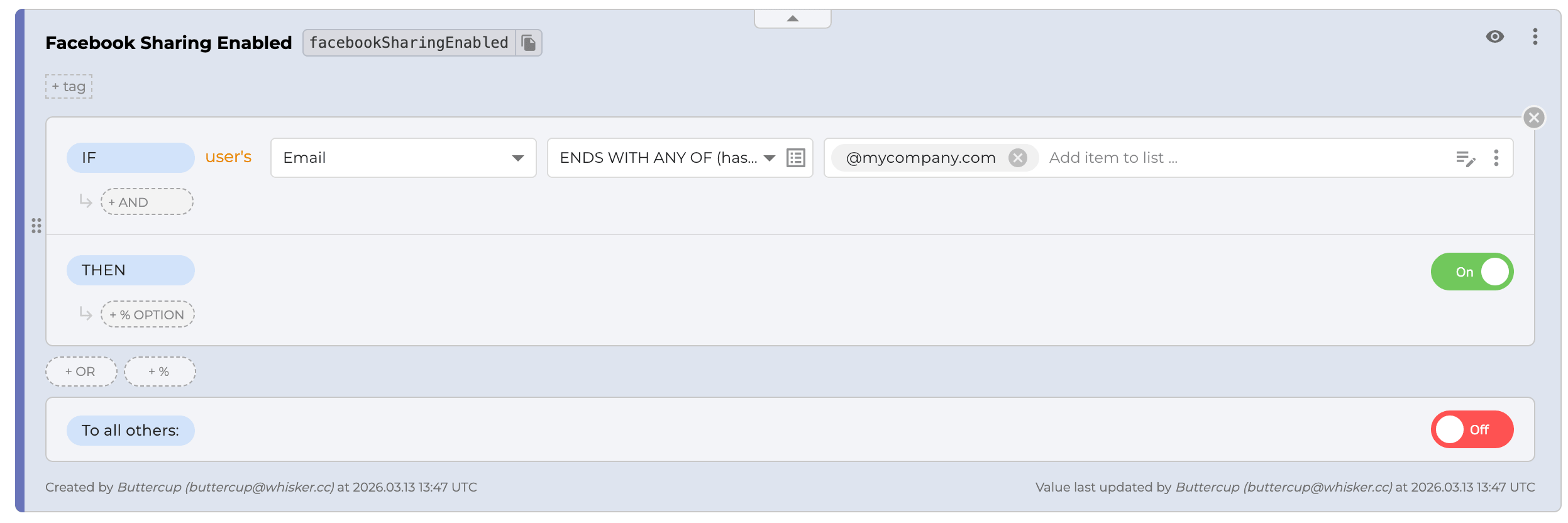
Everyone else will still receive the OFF value, so the feature remains hidden from external users.
Step 3: Expand to Trusted Users (Beta Group)
Next, you can expand the rollout to a slightly larger group. In addition to internal team members, many teams include a small group of trusted users such as friends, beta testers, or early adopters. These users can provide valuable feedback before the feature becomes available to everyone.
In this example, the feature is enabled for users whose email contains @mycompany.com or @friends.com.
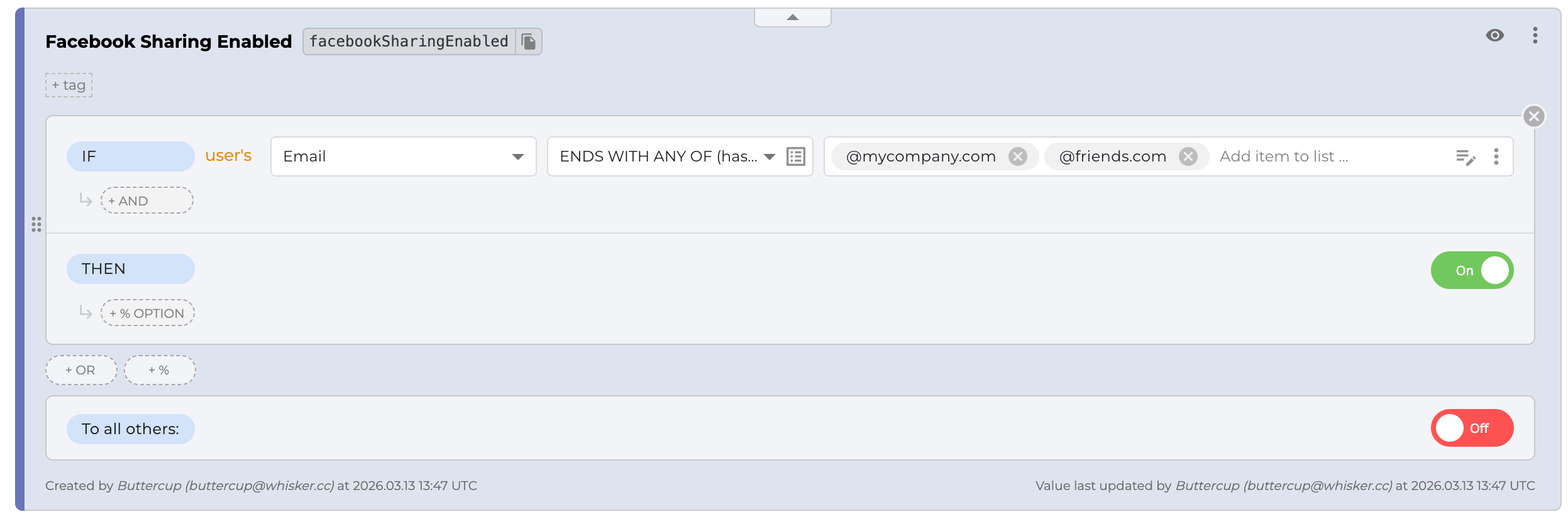
Everyone else will still receive the OFF value, so the feature remains hidden from the wider audience. This step helps gather feedback from real users in a controlled way before moving to a broader rollout.
Step 4: Release to 1% of Users - But No Sensitive Users
If more feedback is needed, the next step is to expose the feature to a small percentage of users. Instead of enabling the feature for everyone at once, you can gradually roll it out to a small portion of your user base and observe how it behaves in production. This approach is commonly known as canary release.
In this example, the feature is enabled for 1% of users, while the remaining 99% still receive the OFF value.
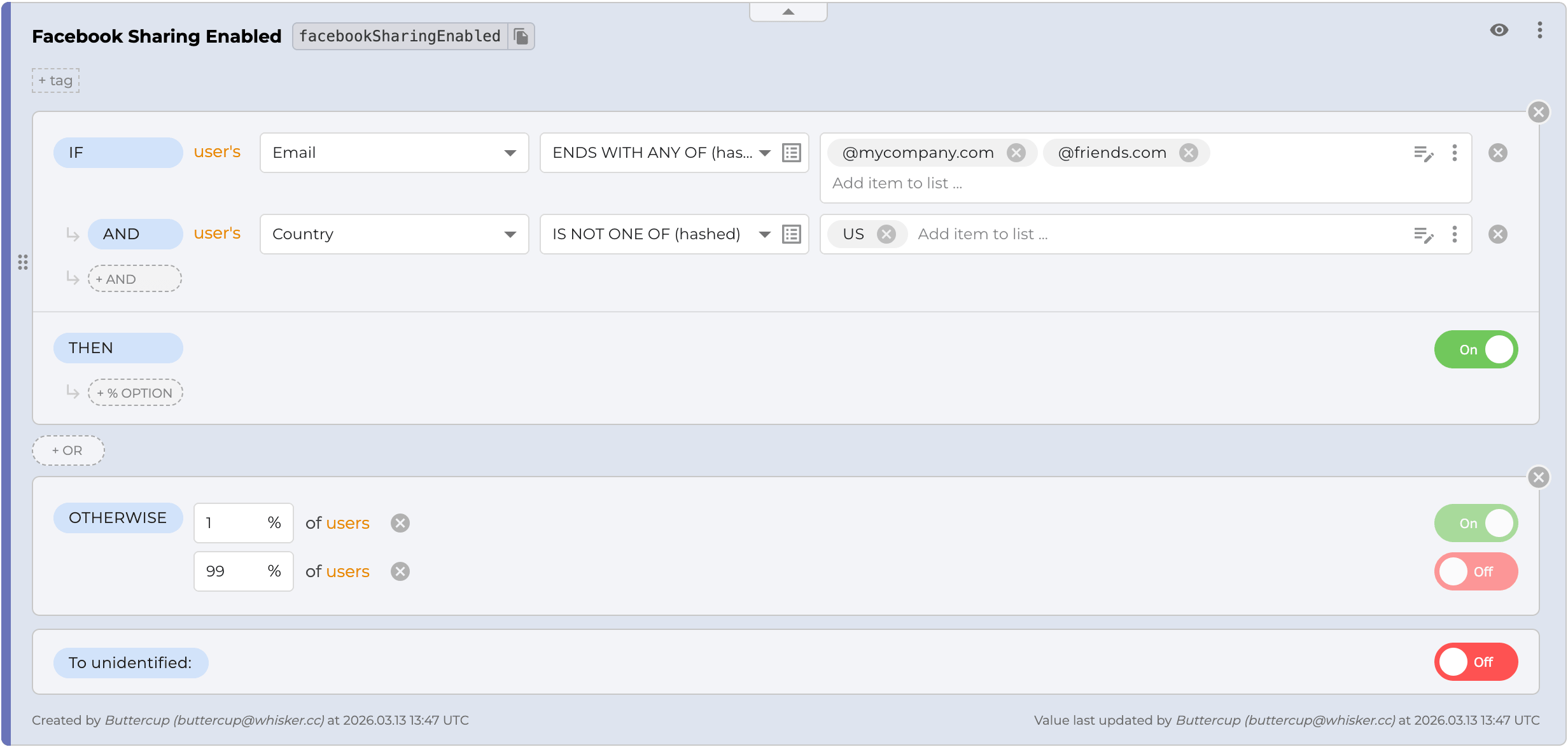
At the same time, it's often a good idea to exclude certain users from early rollouts. These might include high-value customers, sensitive markets, or users who rely heavily on the stability of your product.
In the screenshot above, users from the United States are treated as sensitive users and are explicitly excluded from the rollout.
This way you can safely collect feedback from a small portion of real users while reducing the risk of impacting your most sensitive user groups.
Step 5: Increase to 5% of Users - But No Sensitive Users
Once the feature works well for internal users and early testers, the rollout can be expanded further.
In this step, the feature is enabled for 5% of users, while sensitive users are still excluded. This gradually increases exposure while keeping the risk under control.
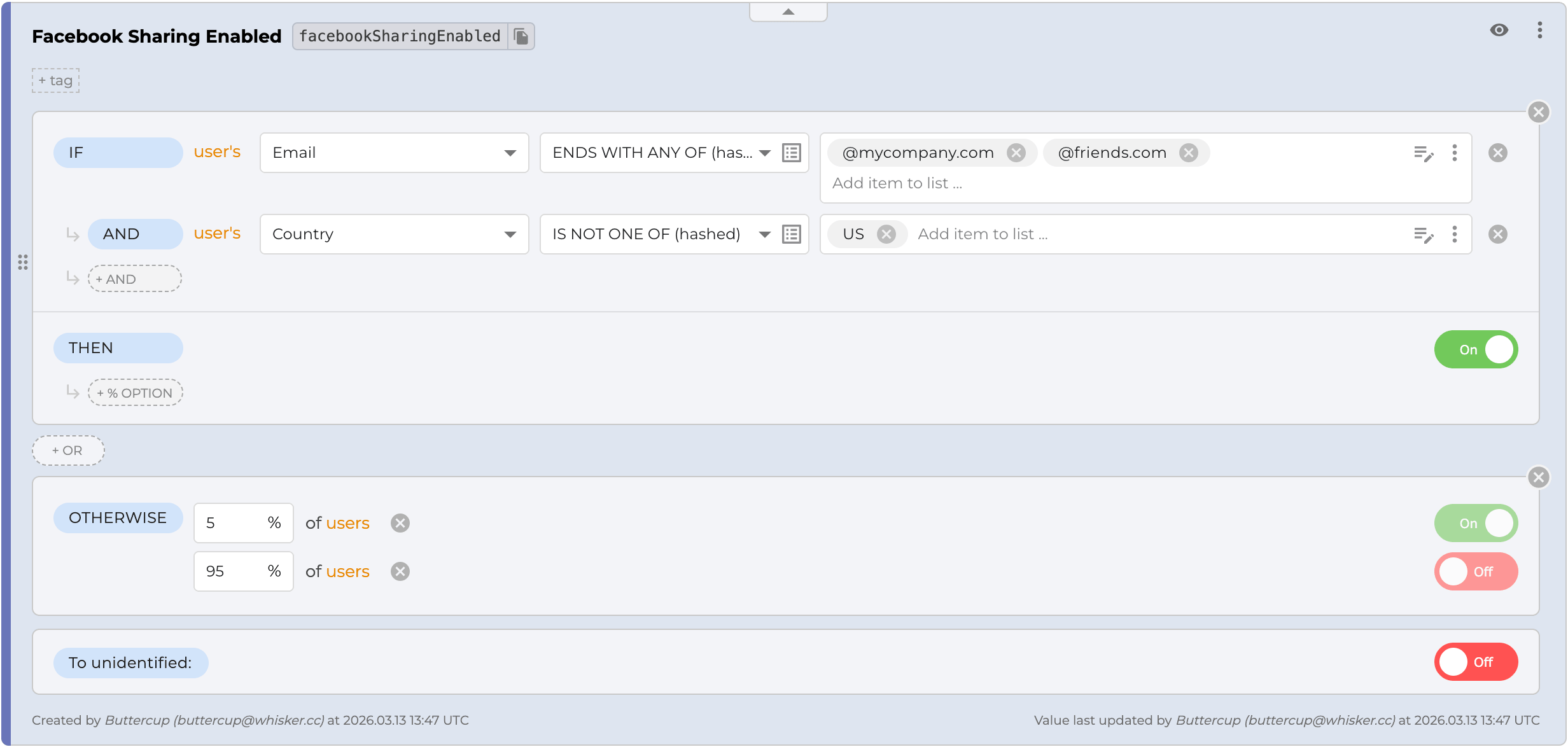
At this point, the feature is available to team members, friends, and a small portion of the general user base, while the remaining users still receive the OFF value.
Step 6: Release to Everyone Except Sensitive Users
At this stage, the feature has already been tested with internal users, trusted testers, and a small percentage of the user base. The feedback collected during those steps should give enough confidence to expand the rollout further.
Now the feature can be enabled for all users except the sensitive group.
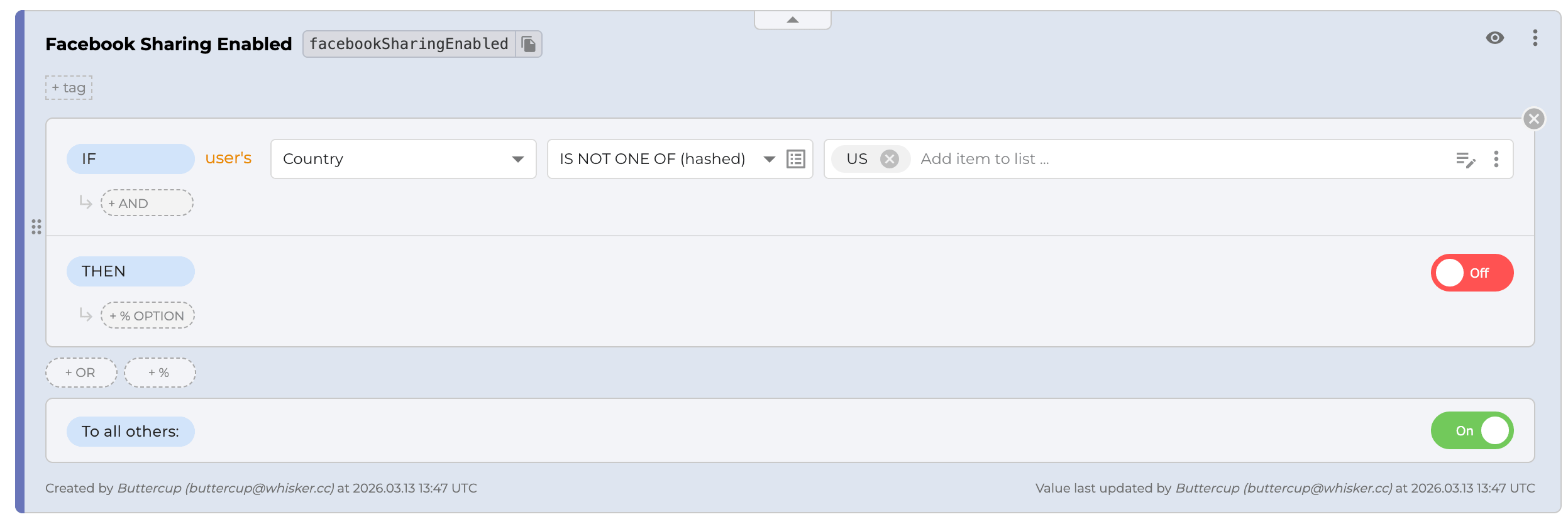
In this example, users from the United States are still excluded from the rollout, while everyone else receives the ON value.
This step exposes the feature to almost the entire user base while still protecting the most sensitive users until the rollout is fully validated.
Step 7: Release to Everyone
If everything looks stable - bugs have been fixed, the UI behaves as expected, and feedback from early users is positive - the feature can finally be released to the entire user base, including previously excluded sensitive users.

At this point, the feature flag simply serves the ON value to all users, completing the rollout.
What to Monitor During a Canary Release
Monitoring is what makes canary releases effective. Without it, you're just rolling out blindly.
Focus on core system metrics first:
- Error rates, to catch failures early
- Latency and performance, to keep the app responsive
- System load, especially if the feature adds overhead
At the same time, watch how users respond:
- User behavior, such as drop-offs or unusual patterns
- Conversion metrics, to measure real impact
If anything looks wrong, feature flags act as a kill switch, letting you disable the feature instantly without redeploying.
Best Practices for Canary Releases
A safe rollout is gradual and controlled. Start small and expand only when confident.
- Begin with internal users
- Roll out step by step (1% → 5% → 25% → 100%)
- Monitor metrics continuously
To reduce risk:
- Exclude sensitive users early
- Use feature flags for instant rollback
After rollout, remove unused flags. Following feature flag naming conventions can also help keep things organized.
Common Canary Release Mistakes
Even with a solid strategy, certain mistakes can reduce effectiveness of a canary release.
Common mistakes include:
- Rolling out too quickly
- Not monitoring key metrics
- Including sensitive users too early
Over time, teams may also run into issues like:
- Leaving old feature flags in the codebase
- Using canary releases as A/B tests instead of a risk-reduction strategy
Keeping these mistakes in mind helps you maintain a safer, more controlled release process while getting the full benefits of canary deployments.
Conclusion
Gradual rollouts help teams release new features with confidence. By starting with internal users, expanding to trusted testers, and slowly increasing the percentage of affected users, teams can monitor performance and catch issues early.
This type of canary release strategy reduces risk compared to releasing a feature to everyone at once.
Feature flag tools like ConfigCat make this process straightforward by providing targeting rules, percentage rollouts, and a simple dashboard to control feature exposure without redeploying code. Because of this, both developers and product teams can safely manage feature releases and experiment directly in production.
If you'd like to try this rollout strategy yourself, you can sign up for ConfigCat and start using feature flags in minutes. ConfigCat offers a generous Forever Free plan, so you can experiment with gradual rollout and feature targeting without any upfront commitment. You can also follow ConfigCat on X, GitHub, LinkedIn, and Facebook to stay up to date with what we're building next.