Feature Flags Explained: How They Work, Why They Matter

You’ve probably heard the term feature flag, maybe in a pull request review, a deployment postmortem, or a job description. The concept sounds simple: turn features on and off without redeploying code. But once you start working with them, you realize there’s a lot more to it than a boolean in a config file. They fundamentally change how you ship software.
This guide explains what feature flags actually are, how they work under the hood, when to use them, when not to use them, how to test them properly, how to manage them across teams, and how to avoid the organizational problems that turn a helpful tool into a maintenance burden.
What Are Feature Flags?
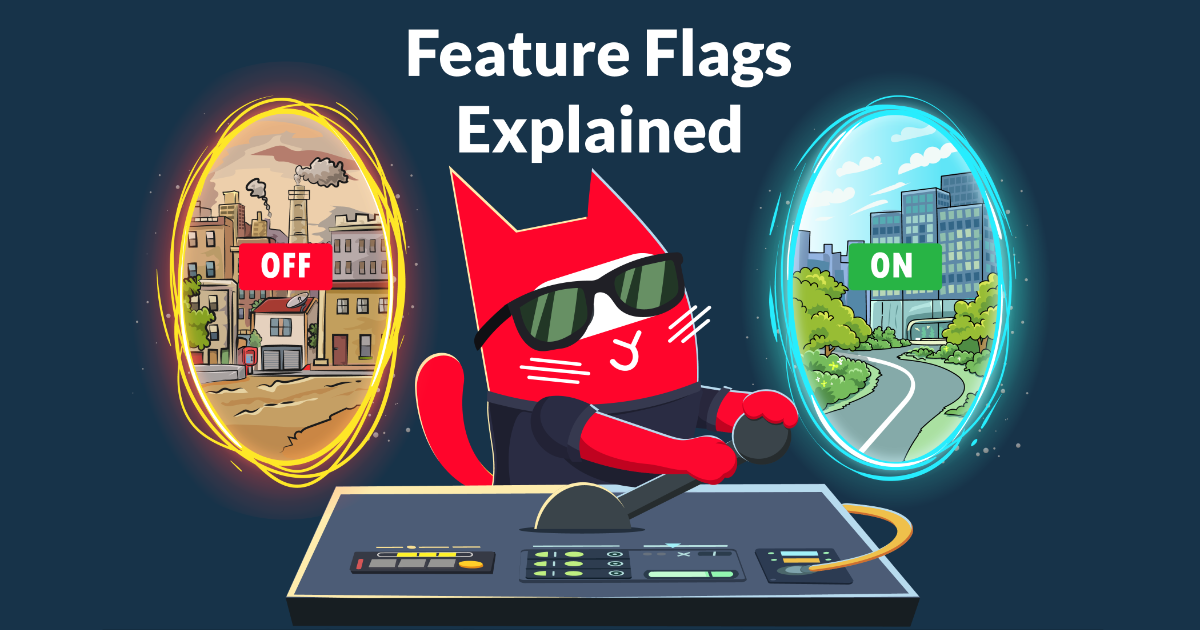
Feature flags (also called feature toggles) are a way to control application behavior without changing code.
A feature flag is simply a conditional in your code whose value is controlled externally (usually from a dashboard or configuration service) and can be changed at runtime.
Here’s the simplest possible version in Python:
import configcatclient

client = configcatclient.get("#YOUR-SDK-KEY#")

if client.get_value("new_checkout_flow", False):
    render_new_checkout()
else:
    render_legacy_checkout()
The important part isn't the if statement. It's where the value comes from. The "new_checkout_flow" flag isn't hardcoded. It's controlled externally, often from a dashboard. That means someone can change it instantly, without touching the code or triggering a deployment.
That separation is what makes feature flags so powerful. The code is deployed, but the behavior is still flexible.
See Feature Flags in Action
Sometimes it's easier to understand feature flags by seeing them work. In this example, the code reads multiple feature flags (like dark mode or sales banner). Toggling them instantly changes the UI without any redeployment.
Try toggling the flags to see how the application updates in real time.
All Feature Flags
Dark mode
Sales mode
Holiday mode





  const client = configcat.getClient("#SDK-KEY#");
  const darkMode = await client.getValueAsync("darkMode", false);
  const salesMode = await client.getValueAsync("salesMode", false);
  const snowEnabled = await client.getValueAsync("snowEnabled", false);

  if (darkMode) {
      enableDarkTheme();
  }
  if (salesMode) {
      showSalesBanner();
  }
  if (snowEnabled) {
      startSnowAnimation();
  }
This is the core idea of feature flags: the code stays the same, but behavior changes instantly.
Why Feature Flags Matter: Deployment vs. Release
Before feature flags, deploying code and releasing a feature were the same event. You merge, you deploy, the feature is live. If something breaks, you roll back the entire deployment, not just the broken feature but everything that shipped with it.
Feature flags change that. Deployment is the act of getting code into production. Release is the act of making a feature visible to users. With feature flags, these happen independently:
- You deploy on Tuesday with the flag OFF, the code is live but nothing has changed for users.
- You release on Friday by flipping the flag. No deployment, no risk window.
- If something breaks, you flip the flag back. Users return to the previous behavior in seconds, no rollback required, even on a Saturday, without needing to call in a developer or DevOps.
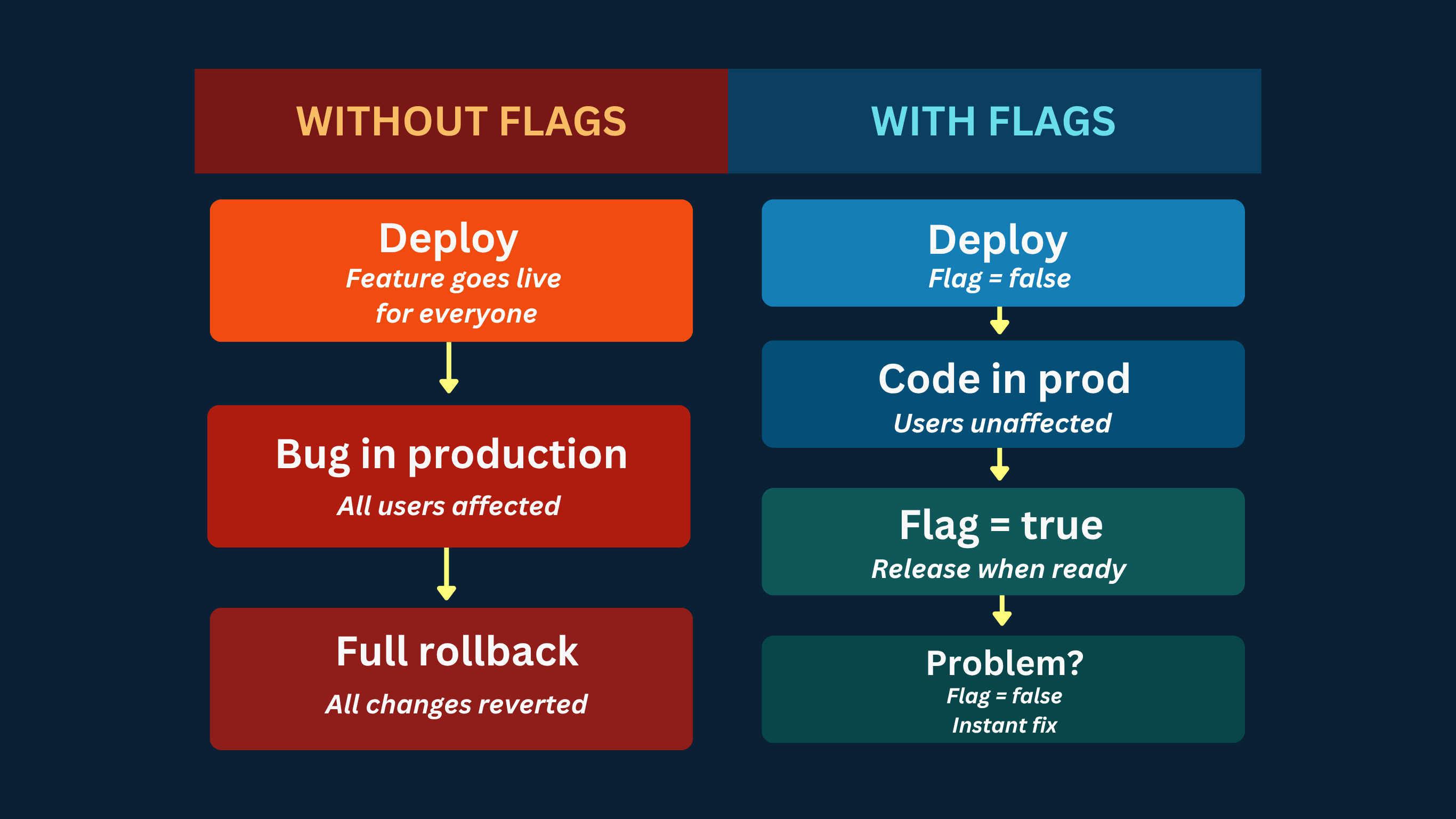
This is called separating deployment from release and it's a core principle of continuous delivery. Research from the DORA State of DevOps report consistently shows that high-performing engineering teams deploy more frequently and have lower change failure rates. Feature flags are one of the key practices that make this possible.
How Feature Flag Evaluation Works Under the Hood
Understanding how feature flags are evaluated isn't just an implementation detail, it directly affects performance, consistency, and how you design your system.
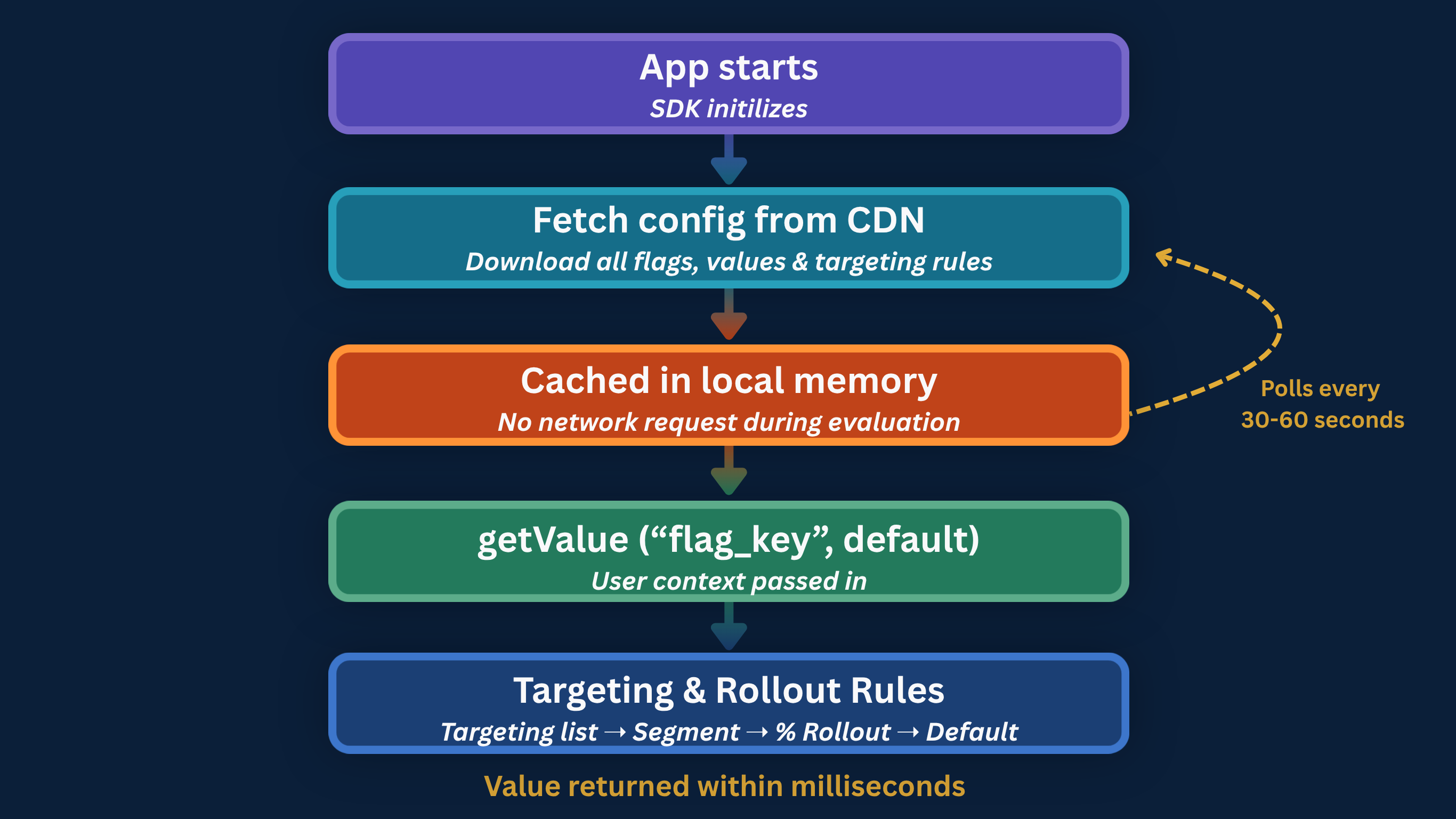
From the outside, a flag check looks simple. Under the hood, a few important things happen to make it fast and reliable.
1. The SDK fetches and caches configuration
When your app starts, the SDK downloads the current configuration from the flag management service and stores it locally.
// Go example — SDK initialization

client := configcat.NewCustomClient(configcat.Config{
    SDKKey: "#YOUR-SDK-KEY#",
    PollingMode: configcat.AutoPoll,
    PollInterval: time.Second * 60,
})
defer client.Close()
The important thing: flag evaluation does not make a network call on every check. The SDK reads from a local in-memory cache. Flag evaluation typically takes microseconds and adds no noticeable latency to your application.
2. The cache is updated in the background
The SDK periodically polls the configuration service for updates. The interval is configurable, commonly 30 to 60 seconds. Some SDKs also support webhook-based invalidation for near-instant propagation. In serverless environments like AWS Lambda, where in-memory state doesn’t persist between invocations, a shared external cache (such as Redis) is the better pattern.
3. Targeting rules are evaluated locally
When your code checks a flag, the SDK evaluates it against the user context you provide.
// Java example — passing user context for targeting
User user = User.newBuilder()
.custom(Map.of(
"country", "US",
"subscriptionPlan", "pro"
))
.build("user_123");
boolean isEnabled = client.getValue(Boolean.class, "new_dashboard_layout", user, false);
The SDK evaluates the flag against the targeting rules you've defined, such as:
- user-specific targeting
- segment rules based on attributes like plan or region
- percentage rollout rules
If none of those rules match, it falls back to the default value you provide.
The percentage rollout is worth understanding specifically, The SDK doesn’t use random chance. Instead, it uses a deterministic hashing algorithm based on the user's identifier and the flag key to assign each user to a stable bucket.
This means the result is always the same for the same user, no matter when or where the evaluation happens.
- hash(userId + flagKey) % 100 → consistent bucket between 0–99
- if bucket < rolloutPercentage → flag is ON for this user
Because of this, feature flag evaluation is both stateless and predictable:
- no user data needs to be stored server-side
- no session tracking is required
- and no user will randomly switch between experiences
A user who is part of the 20% rollout today will still be part of that same 20% tomorrow, across sessions, devices, and even platforms.
This is what makes canary releases reliable. When you gradually roll out a feature, you're not exposing it to a different group of users each time. You're expanding a stable group which makes it much easier to monitor behavior, detect issues, and build confidence before going to 100%
4. Your code executes the correct path
The SDK returns the value, your code branches, done. The entire process from calling getValue to executing the right code path takes under a millisecond in any long-running application.
The Four Types of Feature Flags
Not all flags serve the same purpose. Understanding the types helps you manage their lifecycle correctly because each type has a different expected lifespan and a different risk profile. The four main types of feature flags you'll encounter in production are release flags, experiment flags, operational flags (kill switches), and permission flags.
1. Release flags
Purpose: Gradual rollout of a new feature
Lifespan: Short (days or weeks)
Release flags are the most common type. They exist to separate deployment from release and enable gradual rollouts. Once a feature is at 100% and stable, the flag should be removed, leaving it in the codebase creates flag debt.
2. Experiment flags
Purpose: A/B testing and production experimentation
Lifespan: Duration of the experiment
Experiment flags return multiple variants rather than a simple boolean. Each variant maps to a different experience, and the distribution across your user base lets you measure which performs better.
// JavaScript — experiment flag with multiple variants

async function renderCheckout(user) {
  const checkoutVariant = await client.getValueAsync(
    "checkout_redesign_experiment",
    "control",
    user
  );

  // Returns: "control" | "single_page" | "progressive"

  switch (checkoutVariant) {
    case "single_page":
      renderSinglePageCheckout();
      break;
    case "progressive":
      renderProgressiveCheckout();
      break;
    default:
      renderLegacyCheckout();
  }
}
In practice, this means you can test completely different user experiences without separate deployments or feature branches.
This is also the mechanism behind fake door testing, where you expose a feature concept to users before building it and measure real demand.
3. Operational flags (Kill switches)
Purpose: Disable unstable or expensive functionality instantly during incidents
Lifespan: Permanent or long-term
Operational flags, often called kill switches, are designed to be flipped under pressure. When something goes wrong in production, you don't want to deploy a fix, you want to turn the problem off.
The default value is critical here. If the flag service is unreachable, the system should fail safe by disabling the risky functionality.
// Go — kill switch for an external recommendation service

useRecommendations := client.GetBoolValue(
    "recommendations_engine_enabled",
    false, // safe default: disable if flag service is unreachable
    user,
)

if useRecommendations {
    products, err = getPersonalizedRecommendations(userID) // External API call
    if err != nil {
        products = getDefaultProductList() // fallback on error
    }
} else {
    products = getDefaultProductList() // fast, local path
}
This pattern is particularly valuable for site reliability engineers. A well-placed kill switch means the response to a production incident is a dashboard toggle, not an emergency deployment at 2 am.
4. Permission flags
Purpose: Control access to features based on user plan, role, or group
Lifespan: Long-term or permanent
Unlike release flags, permission flags aren’t removed after a rollout. They become part of how your product works, controlling who gets access to what.
This is where feature flags start to overlap with product logic, not just release strategy. They're often used for things like premium features, roll-based access, or region-specific functionality.
// Java — permission flag gating a premium feature

User user = User.newBuilder()
    .custom(Map.of("plan", currentUser.getSubscriptionPlan()))
    .build(currentUser.getId());

boolean canExportData = client.getValue(Boolean.class, "csv_export_enabled", user, false);

if (!canExportData) {
    return ResponseEntity.status(403).body("Upgrade to Pro to export data");
}

// proceed with export
Because these flags tend to live longer, they require clear ownership, proper documentation, and regular review.
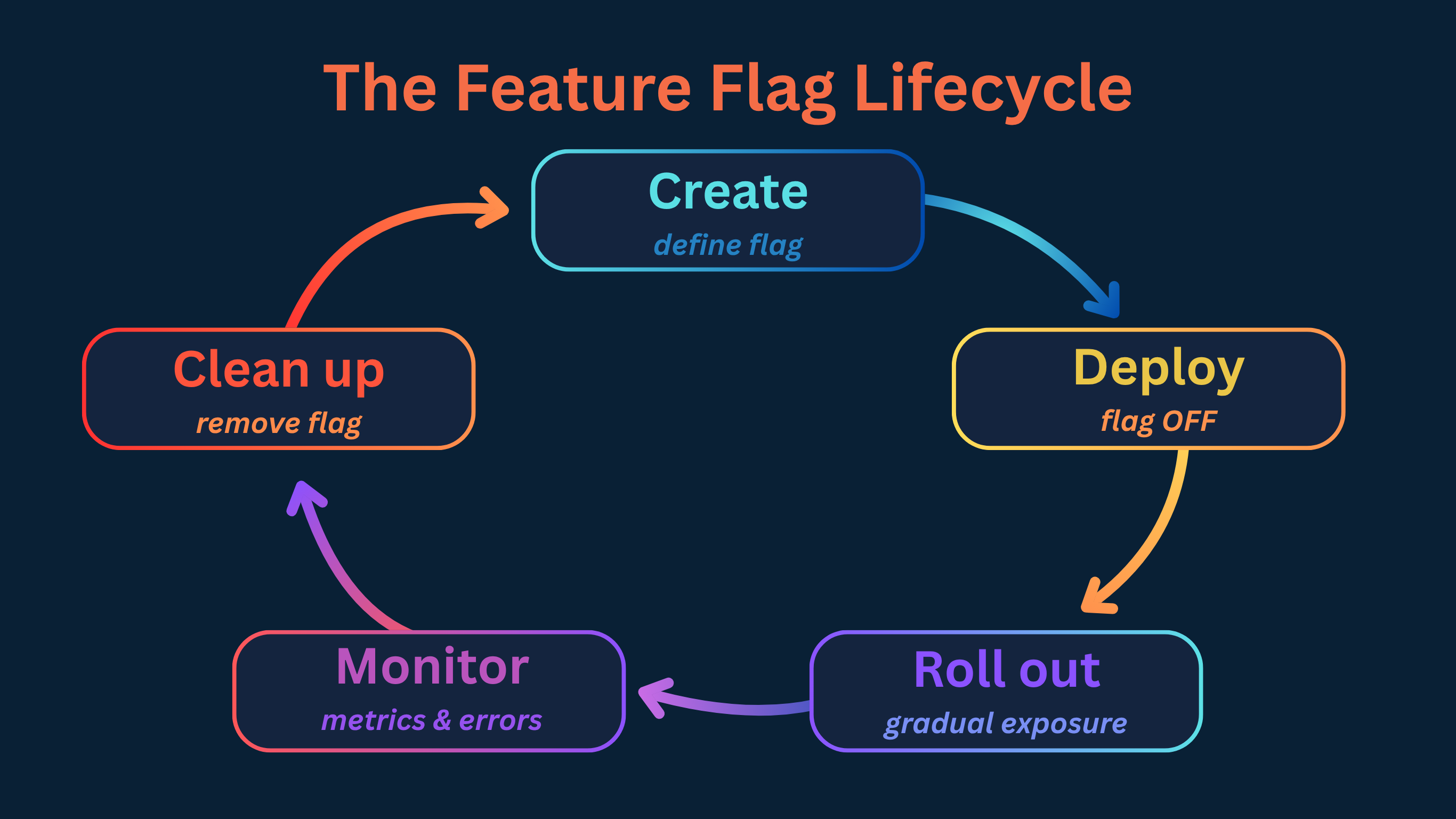
The Feature Flag Lifecycle
Every flag passes through stages. Understanding the lifecycle helps you avoid the two most common failure modes: flags that never get removed, and flags removed before it’s safe to do so.
Done right, feature flags don't just help you release safely. They help you operate cleanly over time.
1. Create
Before writing a line of code, define the flag in your management tool and document:
- What does this flag control?
- Who owns it?
- What is the safe default if evaluation fails?
- When should it be deleted?
That last question is the one most teams skip. Answering it at creation time makes cleanup decisions obvious later instead of ambiguous forever.
2. Deploy
The feature ships to production with the flag set to False. From the user’s perspective, nothing has changed. From an engineering perspective, the code is already live and running in your production environment.
This is a meaningful safety step that’s easy to undervalue. Bugs that only appear under real production conditions (memory leaks, race conditions, performance issues under real load) can surface before any user is affected.
3. Roll out
Once you're confident the system is stable, you start exposing the feature to real users gradually.
A typical rollout might look like this:
| Stage | Audience | Duration | What to watch |
|---|---|---|---|
| Internal | Employees only | 1–2 days | Crashes, basic functionality |
| Canary | 1–5% of users | 3–5 days | Error rates, latency, conversion |
| Partial | 10–50% of users | 3–7 days | User behavior, support volume |
| Full | 100% | — | Confirm stability, schedule cleanup |
Define what “healthy” looks like before you start. Rollback decisions made against pre-defined criteria are fast and confident. Rollback decisions made by gut feel in the middle of an incident are slow and stressful.
You can also combine rollout with soak testing, letting the feature run at a fixed percentage for an extended period to catch issues that only emerge over time.
4. Monitor
A flag change you can’t measure is a flag change you can’t safely make. Before enabling a flag for real users, make sure you can answer:
- Which users are receiving which variant?
- How do error rates differ between flag states?
- What's happening to key business metrics?
Feature flags don't replace observability, they depend on it. Without monitoring, feature flags increase risk instead of reducing it. Most teams integrate with tools like Datadog, New Relic, or Sentry to track the impact of each rollout step in real time.
5. Clean up
Once a feature is at 100% and stable, the flag has served its purpose. Remove it from the flag management tool and from the codebase. Leaving old flags behind increases complexity, makes code harder to read, and creates long-term maintenance risk.
Feature Flag Use Cases
Feature flags are one of those tools that seem simple at first, but once you start using them, they quietly spread across everything. What begins as a safe rollout mechanism turns into a way to experiment, control risk, and even reshape how teams collaborate.
Here are the most common (and most valuable) ways teams actually use them in practice.
Gradual rollouts
Instead of releasing a feature to everyone at once, you start small.
Release to 1% of users, watch your error dashboards, then expand to 10%, 50%, 100%. A bug that would have hit your entire user base now affects a fraction of them, and you catch it while you can still react calmly.
This is closely related to ring deployment, a pattern where you define explicit rings of users and move through them with explicit validation gates.
Canary release
A canary release is a gradual rollout specifically designed to catch regressions before they affect your full user base. You deploy to a “canary” cohort (typically 1-5% of users), monitor key metrics and only proceed if the canary is healthy.
The important part isn't the percentage. It's the discipline of validating before expanding.
A/B testing and experimentation
Feature flags don't just control exposure, they also enable learning. Different users can see different versions of a feature, and you can measure which one performs better. That could be a checkout flow, a pricing page, or even a button label.
The key advantage of server-side experimentation is that it happens before the response reaches the user:
- No flicker
- No layout shifts
- No dependency on JavaScript loading
You're measuring real behavior from the moment the request hits your system.
Kill switches for production incidents
When something breaks in production, the fastest resolution is disabling the feature, not redeploying, not rolling back, not waiting for a hotfix to pass CI. A kill switch turns a potential 30-minute incident into a 30-second one. This is testing in production with a safety net.
Infrastructure migrations
This is one of the most underused applications of feature flags, and one of the highest-value. When migrating from one database, API, or third-party service to another, you can use a flag to route traffic gradually from the old system to the new one:
# Python — infrastructure migration flag

use_new_payments_api = client.get_value("payments_stripe_v2", False, user_object)

if use_new_payments_api:
    result = stripe_v2_client.charge(amount, currency, token)
else:
    result = stripe_v1_client.charge(amount, currency, token)
Environment-based releases
Different behavior across environments without code changes:
| Environment | Flag State | Purpose |
|---|---|---|
| Development | Enabled | Developers can work with the full feature |
| Staging | Enabled | QA validates the full experience |
| Production | Disabled | Users see stable behavior until release |
This means the same codebase runs everywhere, with environment-specific behavior controlled externally.
User targeting and dogfooding
Enable a feature for internal employees before any external users. Let them find the bugs, give feedback, and validate workflows before customers see anything. This dogfooding or champagne brunch approach is one of the highest-quality pre-release testing methods available because it runs in your actual production environment with real data.
Feature Flags vs. Configuration Files
At first glance, feature flags can look like just another form of configuration. After all, both control how your application behaves without changing the core logic. But the difference shows up the moment you need to move fast.
Traditional configuration files require modifying a file, often redeploying or restarting the service, and they apply the same value to every user. They weren't designed for frequent change, and they weren't designed for experimentation.
Feature flags were. They let you change behavior at runtime, target specific users, and roll things out gradually, all without touching your codebase or triggering a deployment.
Here's how they compare in practice:
| Capability | Config file | Feature flag |
|---|---|---|
| Change without redeployment | Sometimes | Always |
| Per-user targeting | No | Yes |
| Percentage rollouts | No | Yes |
| Instant propagation | No | Yes |
| Audit trail | No | Yes (with a tool) |
| Safe default on outage | Manual | Built-in |
| Evaluation analytics | No | Yes |
The key distinction isn’t just runtime vs. deployment-time. It’s that feature flags are designed to be changed frequently, often by non-engineers, with built-in targeting logic and a full history of who changed what and when.
Configuration files are static by nature. Feature flags are dynamic by design.
If you're just setting a value once and rarely touching it again, a config file is perfectly fine. But the moment you need control, experimentation, or safe releases, you're no longer dealing with configuration. You're dealing with progressive delivery.
When NOT to Use Feature Flags
Feature flags are powerful, but they're not a universal solution. Used in the wrong places, they add complexity without adding value.
Knowing when not to use them is just as important as knowing when to reach for them.
Long-term configuration management
If a value changes rarely, doesn’t need user targeting, and doesn’t need an audit trail, an environment variable or config file is simpler and more appropriate.
Not everything needs to be dynamic. In fact, forcing rarely changing values into feature flags often makes things harder to reason about, not easier. Feature flags are designed for change. If there's no change, there's no benefit.
Secrets and credentials
API keys, database password, OAuth secrets - these belong in dedicated secrets managers, not feature flags.
Feature flags are evaluated in ways that may expose their values to clients (especially in frontend or mobile environments). That makes them the wrong place for anything sensitive. If leaking it would be a security incident, it shouldn't be a flag.
Core business logic that should never be disabled
A feature flag implies optionality. If turning something off would fundamentally break your application, it shouldn't be behind a flag in the first place.
Authentication, core data persistence and payment processing are foundational parts of your system. Treating them as optional introduces risk, not flexibility.
Replacing proper access control
Feature flags are often used to gate features, but they are not a replacement for authorization.
A flag can decide who sees a feature. It should not decide who is allowed to perform an action. If you rely solely on flags to enforce security boundaries without proper server-side checks, you don't have feature control. You have a security gap.
Hiding permanently broken features
This one happens more often than teams admit. A feature is buggy, so it gets turned off. Weeks pass. Then months. The flag stays false and the code stays in the system.
At that point, the flag isn't helping anymore. It's hiding unfinished work and adding noise to your codebase.
Feature flags are meant for controlled release, not permanent deferral. If a feature isn't coming back, remove it.
Who Uses Feature Flags Across the Organization
Feature flags often start with developers and expand from there. Once the infrastructure is in place, the control over releases starts to move beyond engineering. What used to require a deployment becomes a decision. And decisions don't always belong to developers.
Product managers
For product managers, feature flags turn release timing into a controllable variable. They can decide who sees a feature, when it goes live, and how it's introduced. That means launches can align with campaigns, experiments can run without engineering bottlenecks, and features can be enabled exactly when they create the most impact.
A product manager flipping a flag during a live demo isn't a workaround. It's the system doing what it was designed to do.
QA engineers
For QA, feature flags remove one of the biggest constraints in testing: environment limitations.
Features can be enabled in staging or even production for internal users, without affecting real customers. Specific scenarios, edge cases, or user segments can be tested on demand, without waiting for a new deployment.
Testing becomes more flexible, and closer to real-world conditions.
Marketing and growth teams
For marketing and growth teams, feature flags unlock experimentation without dependency. Campaigns don't have to wait for releases. Landing page variations can be tested in real time. Features can be enabled for specific regions, audiences, or cohorts as part of a broader strategy.
This is where feature flags start to overlap with growth tooling, not replacing it, but enabling faster iteration.
Site reliability engineers
For SREs, feature flags are a control mechanism under pressure. Operational flags, often called kill switches, allow teams to degrade non-critical functionality gracefully when systems are under stress. Instead of firefighting with emergency deployments, they can stabilize the system with a single toggle.
Disabling a recommendation engine or a heavy background process during peak load isn't just a technical decision. It's a reliability strategy.
What ties all of this together is not just the technology, but the shift in ownership.
Feature flags allow engineering to build the system, while giving other teams controlled ways to operate within it. That's what a feature flagging tool makes possible: centralized control with distributed decision-making.
When to Bring in a Feature Flag Management Tool
You can implement basic feature flags yourself, a value in a database, a simple API, a cache layer. This works until it doesn’t.
The challenges that appear at scale are organizational, not technical. A homegrown system gives you toggles. A management platform gives you control.
| Capability | Why it matters |
|---|---|
| Audit log | Every flag change is traceable: who, what, when |
| Evaluation analytics | Know if a flag is still being evaluated before deleting |
| Targeting and segmentation | User-specific and percentage rollouts without custom infrastructure |
| Server-side SDKs | Backend enforcement across languages |
| Lifecycle management | Surface zombie flags before they accumulate |
| Role-based access | Non-engineers can control flags safely without touching code |
The right time to bring in a tool is before the organizational problems appear. If more than one team is creating flags, or you have more than 20-30 active flags, manual management is already a liability.
Final Thoughts
Feature flags might start as a small technical decision, but they quickly become part of how you build, release, and operate software.
They give you control over what users see and when they see it. They let you test ideas safely, roll things out gradually, and react quickly when something doesn't go as planned. Over time, they shift releases from risky events to controlled decisions.
Of course, like any powerful tool, they come with responsibility. Used well, they make your system more flexible and your team more confident. Used poorly, they create noise and complexity. The goal isn't to flag everything, it's to use flags where they actually give you an advantage.
If you're ready to see how feature flags work in practice, you can get started with ConfigCat's Forever Free plan in minutes and make your next release a little less stressful.
For more information, check out ConfigCat's website. You can also stay up to date with the newest developments by following ConfigCat on GitHub, LinkedIn, X, or Facebook.