Feature Flags in Microservices and Serverless Architecture (AWS Lambda and .NET)

In monolithic applications, every change requires redeploying the entire system. Now, imagine pushing a payment processing update to your e-commerce platform during peak traffic. A bug slips through. You deploy a fix. That fix introduces another issue. Suddenly, you're rolling back the whole application under pressure.
Microservices reduce that blast radius by breaking systems into smaller, independently deployable services. When you combine microservices with feature flags, you gain something even more powerful: the ability to change production behavior without redeploying code. If one service misbehaves, you don't redeploy. You disable the feature. You stabilize and fix forward. That level of runtime control is what makes feature flags essential in distributed systems.
In this guide, we'll explore how feature flags work in microservices and serverless architectures, and walk through a practical example using AWS Lambda, .NET, Redis, and ConfigCat.
What Are Feature Flags in Microservices?
Feature flags (also called feature toggles) are configuration switches that allow developers to turn application features on or off without redeploying code. In a microservices architecture, this becomes extremely powerful.
Instead of coordinating releases across multiple services, teams can:
- Deploy code with features disabled
- Gradually enable functionality when ready
- Disable problematic features instantly
Feature flags are commonly used for:
- Progressive rollouts
- Canary releases
- A/B testing
- Kill switches for production incidents
- User segmentation
This decouples deployment from release, which is one of the key principles of modern DevOps practices.
How Feature Flags Work in Microservices Architecture
A microservices architecture is a design approach in which a single application is composed of many loosely coupled, independently deployable services. Each service typically focuses on a single business capability, such as:
- Product catalog
- Authentication
- Payments
- Checkout
- Order processing
These services communicate through APIs.
While this architecture improves scalability and team autonomy, it also introduces release coordination challenges.
For example:
- Team A (Payments) is ready to release a new feature.
- Team B (Invoicing) isn't ready yet.
Without feature flags, Team A waits. Deployment timing becomes coupled across teams.
With feature flags, Team A can deploy the new code with the feature disabled. When the dependency is ready, the flag is enabled remotely. No coordinated deployment window, no cross-team blocking
Example: Safe Feature Rollout
Imagine you introduce a "Buy Now with One Click" button to your Checkout Service, but this feature depends on data from another microservice, the Shipping Service. If the Shipping Service starts lagging or crashes, you can quickly revert to the standard multi-step checkout without rolling back any code—simply by toggling the flag OFF.
Beyond simple ON/OFF control, they enable:
- Targeting specific users, regions, or environments.
- A/B testing new behavior.
- Progressive Rollouts (canary releases).
In a microservices architecture, this provides a safety net for features that depend on each other. You can release incrementally, validate safely, and limit exposure when things go wrong.
Microservices vs Serverless Architecture
Although the terms are sometimes used together, microservices and serverless refer to different things.
| Concept | Description |
|---|---|
| Microservices | How an application is structured |
| Serverless | How services are deployed and executed |
Serverless platforms like AWS Lambda are often used to run microservices because they provide:
- Automatic scaling
- No server management
- Pay-per-execution pricing
- Fast deployment cycles
Each microservice can run as its own set of Lambda functions.
When combined with feature flags, this architecture allows teams to control behavior remotely across distributed services without redeploying functions.
Challenges of Using Feature Flags in Serverless (AWS Lambda)
Lambda functions are short-lived by design. They boot up, handle a request, and return.
AWS may reuse execution environments between invocations (warm starts), but you cannot rely on in-memory state being preserved. Cold starts create a fresh execution environment with no cached data. This matters for feature flag evaluation.
If your Lambda function fetches feature flag configuration from an external API on every invocation:
- Latency: Network calls before each execution slow everything down.
- Cost & Limits: You'll burn through API quotas and rack up data transfer fees.
With feature flags in serverless architectures, you need to play by different rules. Depending on how quickly your Lambdas need to react to feature flag changes, you can cache your feature flag data and refresh it periodically to avoid serving stale flags.
How to Implement Feature Flags in AWS Lambda with .NET
Let's walk through a practical example of integrating feature flags in a .NET AWS Lambda function using ConfigCat.
In Lambda environments specifically, the in-memory cache used by the polling modes: Auto polling, Lazy loading, and Manual polling may not be applicable to every use case, since the cache can be empty on each Lambda invocation. In such scenarios, opting for a custom cache implementation is often recommended. Alternatively, if your Lambdas use multiple SDK instances, leveraging a Shared cache can be optimal.
Here's how to set it up.
Prerequisites
To follow this tutorial, you will need a few tools installed and accounts set up. Don't worry, free tiers work perfectly for everything here.
- A ConfigCat Account: You can sign up for a forever free account here.
- An AWS Account: You will need access to the AWS Console and a user with permissions to create Lambda functions.
- A Redis Instance: For this tutorial, you can use a free Redis Cloud database to quickly obtain a connection string. Amazon ElastiCache is typically used in production AWS environments.
- The .NET SDK: We are using .NET 10.0, which you can download here.
- Command Line Tools:
- AWS CLI: configured with your credentials (
aws configure). - AWS Lambda Tools for .NET:.
- AWS CLI: configured with your credentials (
Step 1: Create a Feature Flag in ConfigCat
Before writing code, we need a flag to control.
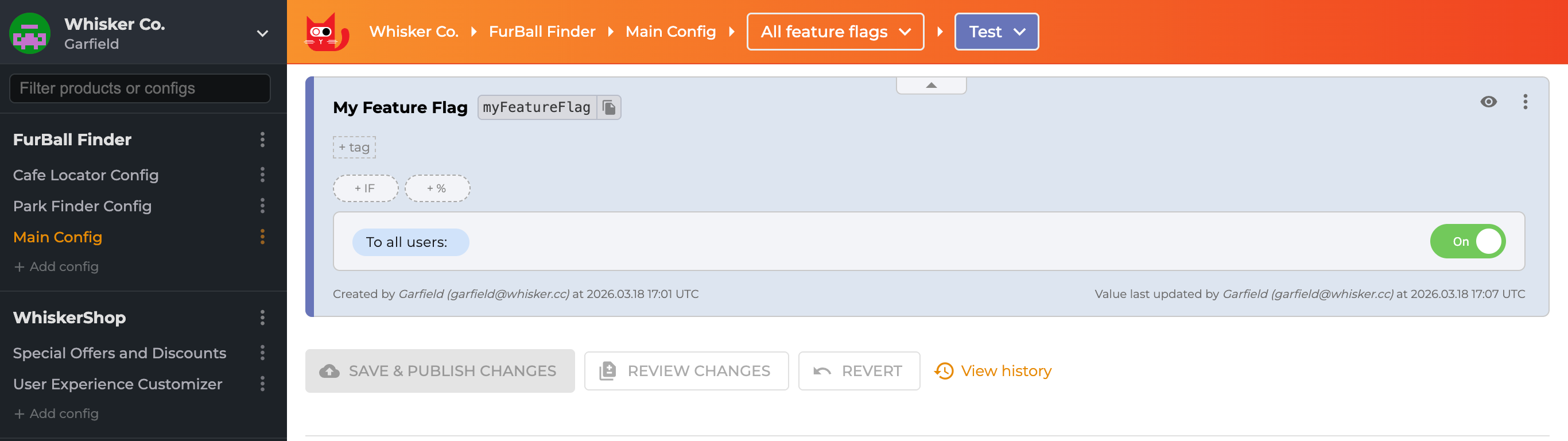
- Log in to the ConfigCat Dashboard.
- Create a new Feature Flag with the name
My Feature Flagand key name isMyFeatureEnabled. - Turn the feature ON (so we can verify it works later).
Step 2: Setting Up the .NET Project
We will use the .NET CLI to create a lightweight Lambda function. Open your terminal or PowerShell and run the following commands:
# Create a new empty Lambda function
dotnet new lambda.EmptyFunction -n ConfigCatLambdaDemo

# Navigate into the project directory
cd ConfigCatLambdaDemo

# Install the ConfigCat Client SDK and Redis Client
dotnet add package ConfigCat.Client
dotnet add package StackExchange.Redis
This installs the necessary NuGet packages to handle .NET feature flags and the Redis cache integration.
Step 3: Implementing the Shared Cache (Redis)
This is the most critical part of this tutorial. In standard apps, internal caching works fine. But in AWS Lambda, in-memory state is not guaranteed to persist between invocations. To prevent your Lambdas from spamming the ConfigCat API on every "Cold Start," we will use Redis as a persistent, shared cache.
Open your Function.cs file and replace the content with the following code. This includes a custom RedisCache class that implements ConfigCat's caching interface:
using Amazon.Lambda.Core;
using ConfigCat.Client;
using ConfigCat.Client.Configuration;
using ConfigCat.Client.Cache;
using StackExchange.Redis;

[assembly: LambdaSerializer(typeof(Amazon.Lambda.Serialization.SystemTextJson.DefaultLambdaJsonSerializer))]

namespace ConfigCatLambdaDemo;

public class Function
{
    private static IConfigCatClient _configCatClient;

    static Function()
    {
        // Add your real ConfigCat SDK key here or add it as an Environment Variable
        var sdkKey = "your-configcat-sdk-key";

        // Add your real Redis Connection String here or add it as an Environment Variable
        var redisConnectionString = "your-redis-connection-string";

        _configCatClient = ConfigCatClient.Get(sdkKey, options =>
        {
            options.ConfigCache = new RedisCache(redisConnectionString);

            options.PollingMode = PollingModes.AutoPoll(pollInterval: TimeSpan.FromSeconds(60));
        });
    }

    public async Task<string> FunctionHandler(string input, ILambdaContext context)
    {
        // Ensure the flag name here matches your Dashboard exactly
        var isFeatureEnabled = await _configCatClient.GetValueAsync("isMyFeatureEnabled", false);

        context.Logger.LogInformation($"ConfigCat Flag value: {isFeatureEnabled}");

        if (isFeatureEnabled)
        {
            return "New Feature Logic Enabled";
        }

        return "Old Feature Active";
    }
}
public class RedisCache : IConfigCatCache
{
    private readonly IDatabase _database;

    public RedisCache(string connectionString)
    {
        var connection = ConnectionMultiplexer.Connect(connectionString);
        _database = connection.GetDatabase();
    }

    public string? Get(string key)
    {
        return _database.StringGet(key);
    }

    public void Set(string key, string value)
    {
        _database.StringSet(key, value);
    }

    public async Task<string?> GetAsync(string key, CancellationToken cancellationToken = default)
    {
        return await _database.StringGetAsync(key);
    }

    public async Task SetAsync(string key, string value, CancellationToken cancellationToken = default)
    {
        await _database.StringSetAsync(key, value);
    }
}
In this tutorial, we use a public Redis Cloud instance for simplicity. In a real-world production environment, you should use AWS ElastiCache.
Using ElastiCache requires configuring your Lambda function to run inside a VPC (Virtual Private Cloud) and setting up Security Groups to allow traffic between the Lambda and the Redis Cluster.
Dedicate a separate application whose sole purpose is to keep your cache up to date. This can be a single Lambda function that initializes the ConfigCat client using Manual Polling and is configured to run on a schedule. When the interval is reached, the Lambda starts, calls forceRefresh() to trigger a cache update, and then shuts down.
Alternatively, you can initialize the client with Auto Polling and define an appropriate polling interval.
Step 4: Deploying to AWS
Now that our code is ready, we need to push it to our AWS cloud. The .NET CLI makes this straightforward with the Amazon Lambda Tools.
-
Install the Lambda Tools (if you haven't installed it):
dotnet tool install -g Amazon.Lambda.Tools -
Deploy the Function: Run the following command in your project folder. It will compile your code and upload it to AWS.
dotnet lambda deploy-function ConfigCatDemo -
Test the Function: Once deployed, you can invoke the function directly from the CLI to see the result immediately:
dotnet lambda invoke-function ConfigCatDemo --payload "test"If your feature flag is turned ON in ConfigCat, you will see the payload response:
New Feature Logic Enabled
Step 5: Verifying Runtime Control
To see the "under the hood" details and confirm the Singleton pattern is working:
- Log in to your AWS Console.
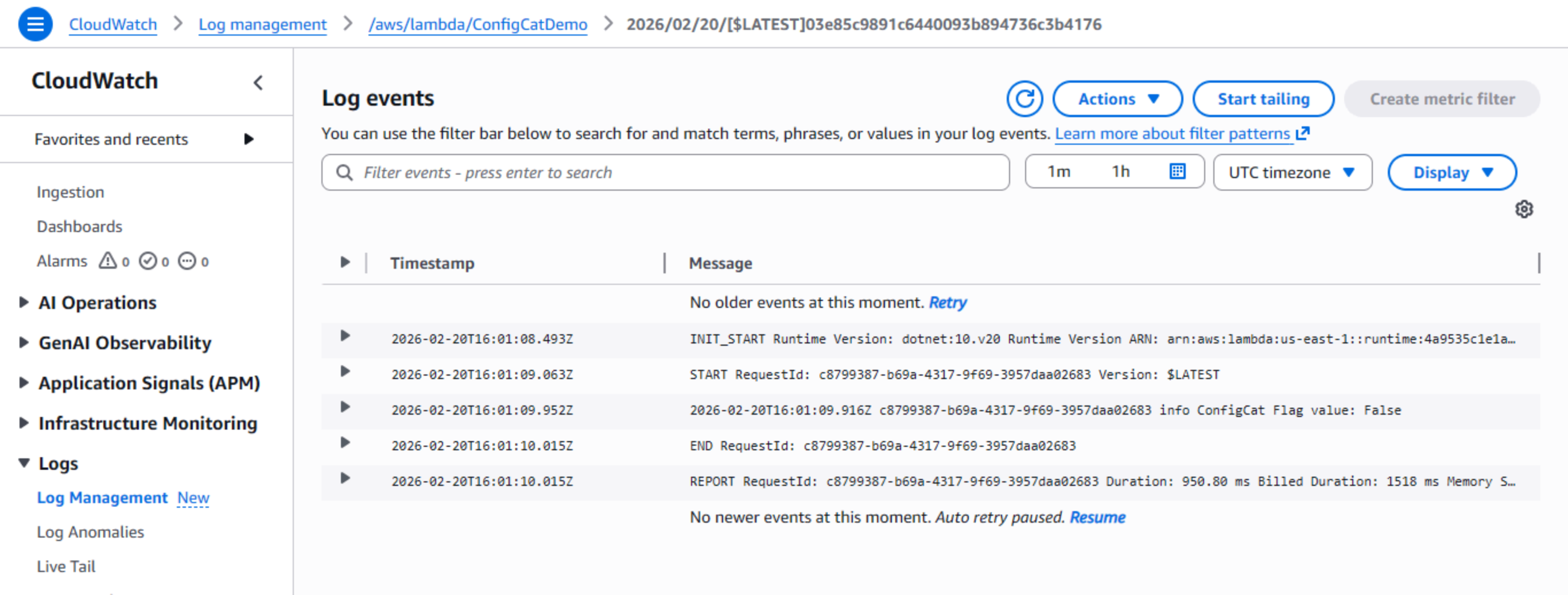
- Navigate to CloudWatch > Logs > Log management.
- Click on
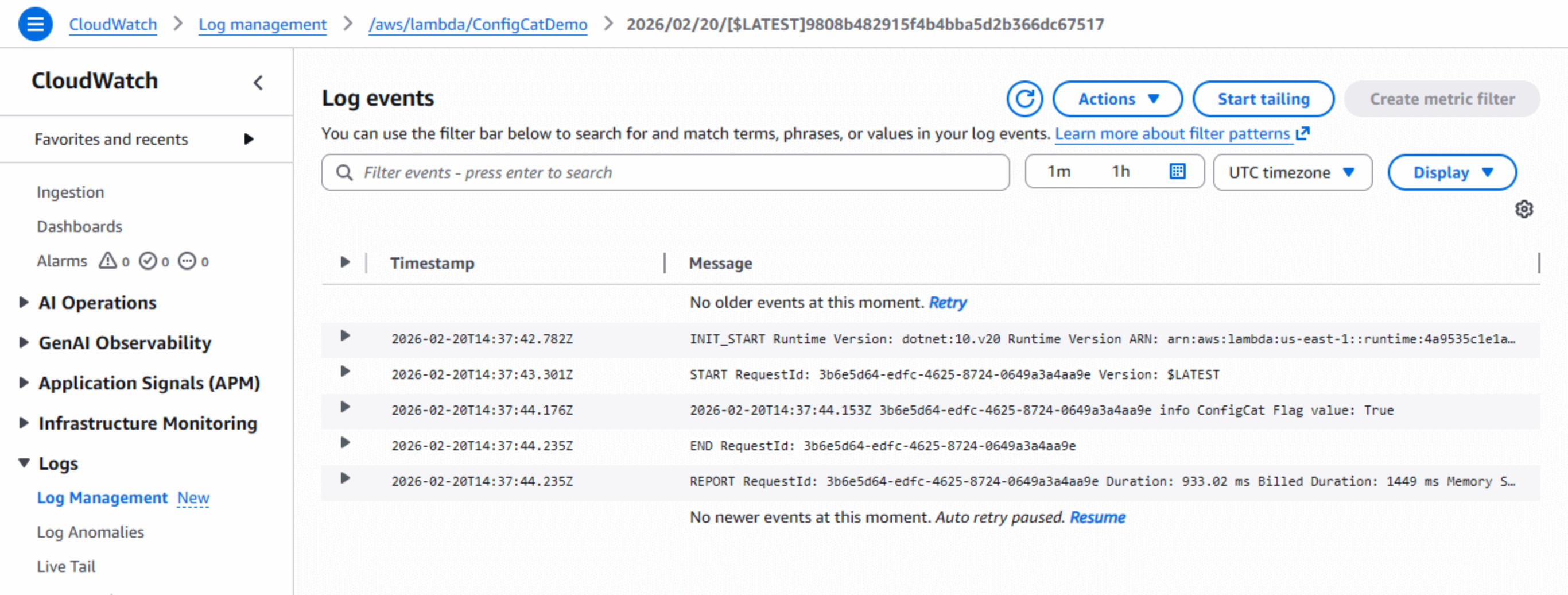
/aws/lambda/ConfigCatDemo. - You will see the logs generated by our code confirming the flag value was retrieved successfully.
Once deployed, you can verify that the feature flag works by toggling it in the ConfigCat Dashboard.
To do this, you go to ConfigCat and toggle the flag OFF.
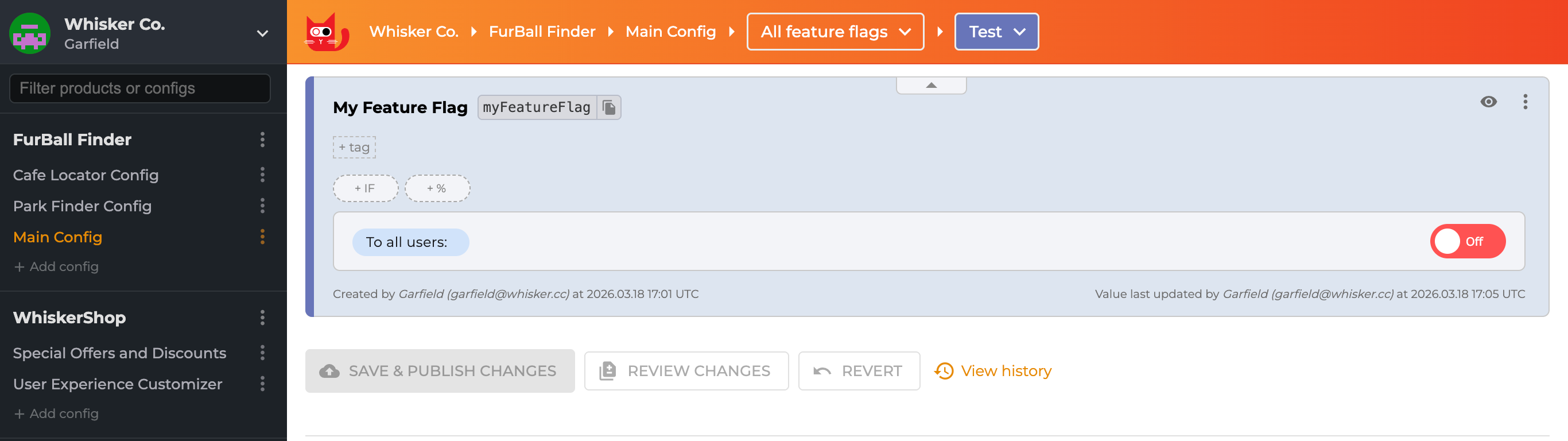
AWS Lambda doesn't listen for ConfigCat updates; it only checks when the function runs. So toggling the flag doesn't instantly change behavior. You need to wait for the cache to expire, then trigger a new execution.
After waiting 60+ seconds, invoke the function again:
dotnet lambda invoke-function ConfigCatDemo --payload "test"
Then, you will see the payload response: "Old Feature Active"
And the CloudWatch logs show the flag evaluated as false:
That's runtime control in action; production behavior changed with zero deployments.
Step 6: Implementing Progressive Delivery
Say you're launching a redesigned checkout experience for your e-commerce site. Pushing it to 100% of customers immediately is a gamble; a bug could tank your conversion rate.
This is where Progressive Delivery shines. Start by serving the new flow to 10% of users. If checkout completion rates stay stable and error logs look clean, bump it to 30%, then 70%, then everyone. It's a controlled rollout, sometimes called a Canary Release.
Traditional setups require custom load balancer logic or proxy configurations to perform canary releases. But, ConfigCat handles it with percentage-based targeting rules without code or infrastructure changes.
To do this:
- Go back to your ConfigCat Dashboard.
- Find your isMyFeatureEnabled flag.
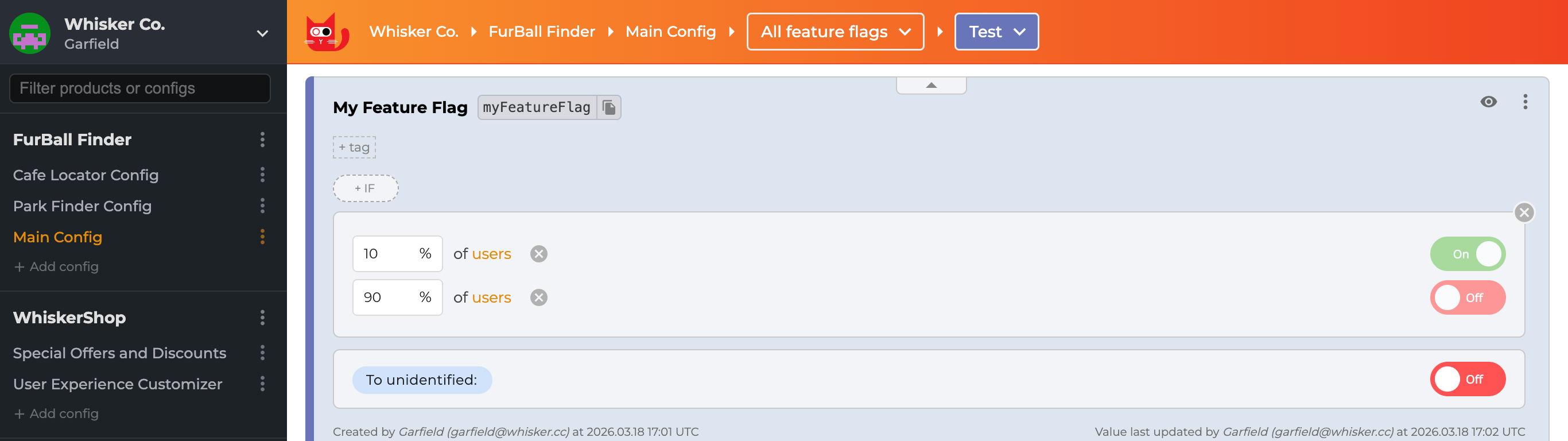
- Instead of changing the main toggle, click on the +% button.
- Set the rule to serve ON to 10% of traffic and OFF to 90%.
Why Progressive Delivery Works Well with Serverless
Since Lambda functions are stateless, each invocation independently evaluates the 10% targeting rule through ConfigCat's SDK.
Here's what that looks like in practice:
- Watch CloudWatch logs as the feature rolls out
- Errors show up? Only 10% of users are impacted
- Everything stable? Bump the percentage (30% → 50% → 100%) from the dashboard
The microservices advantage:
This decouples deployment timing across teams. If your checkout flow needs the new payment processing API, but that API isn't deployed yet. Ship your code with the flag off. When the payments team eventually deploys, you enable the flag remotely. No waiting, no coordinated release windows, no "we can't ship until Team B is ready" conversations.
Feature Flag Best Practices for Microservices and Serverless
When using feature flags in distributed systems, keep the following practices in mind.
-
Always define fallback values: That fallback value in
GetValueAsyncdetermines what happens during ConfigCat outages. Pick the safest option by disabling the new feature. I've seen production incidents from missing defaults. -
Clean up old flags: Most teams use feature flags to manage and release a new feature. Once you've hit 100% rollout and the feature is stable, remove the flag from your code. The Zombie Flag Report and the Code References tool do a good job of helping you identify stale flags in your code before they become technical debt.
-
Balance cache duration 60 seconds hits a good balance: flag changes propagate reasonably fast without excessive API calls inflating your Lambda execution costs. You can adjust this interval based on how quickly you need updates vs. what you're willing to pay.
Conclusion
Feature flags are a powerful tool for managing releases in microservices and serverless architectures.
By combining AWS Lambda, Redis caching, and ConfigCat, teams can safely control application behavior without redeploying code.
This approach enables:
- safer deployments
- progressive rollouts
- instant rollback capabilities
- better collaboration across teams
Whether you're running microservices on Kubernetes or serverless workloads on AWS Lambda, feature flags provide a flexible way to release software with confidence.
Beyond .NET, ConfigCat provides a wide range of SDKs that work seamlessly with other AWS Lambda runtimes, including Node.js, Python, Go, and Java. To learn more, check out ConfigCat's official documentation.
To get more posts like this and the latest updates, follow ConfigCat on X, Facebook, LinkedIn, and GitHub.