A Quick Guide to Feature Flag Naming Conventions

Can naming feature flags be hard?
Yes. Just like variables in programming, naming feature flags can get tricky if you don't follow a naming standard. When feature flags don't have good names, it can be difficult for people using them to remember what they do.
In this guide, we'll walk through feature flag naming conventions and best practices that help teams manage flags at scale.
A Quick Refresher on Feature Flags
Feature flags (or feature toggles) are controls that allow you to turn features in your software on or off without having to redeploy your code. Using feature flags, you can separate deployments from releases by deploying code and keeping it disabled until you're ready to enable it.
Teams use feature flags for:
- Canary releases to test new functionality with a small percentage of users
- A/B testing and product experiments
- Gradual feature rollouts (progressively releasing features to users)
- Kill switches to instantly disable problematic features
- User segmentation (enabling features to specific user groups)
- Environment-based behavior (different features in staging vs production)
For engineering, product, marketing, and other software-related teams, using feature flags is a key practice in modern DevOps and progressive delivery.
With so many flags in production, clear naming conventions become critical for maintainability and team collaboration.
Feature Flag Naming Conventions
Below are some conventions that help teams create clear, scalable feature flag names.
1. The General Rule: Be Descriptive
A feature flag's name should be descriptive enough to explain its function; its function should be obvious to anyone who looks at it. That said, don't be afraid to give your feature flags long names. It's better for a feature flag to have a lengthy, descriptive name than a short, confusing one. Let’s take an example.
Imagine that an online Markdown editor software has a new spellcheck feature in development. The developers want to hide it behind a feature flag and turn it on when it's ready for release. They name the feature flag:
rollout_text_editor_spellchecker
The word "rollout" indicates that the flag enables the spellchecker feature. "text_editor_spellchecker" is self-explanatory. This descriptive flag name is unlikely to confuse users. Next, let's consider what other details we can add to feature flag names.
2. Include the Responsible Team
Considering the size of development teams nowadays and the fact that non-development teams (like marketing and product management) can be in charge of toggling feature flags, it can be helpful to prefix a feature flag’s name with the name of the team responsible for toggling it. Here's an example using our spellchecker flag from before:
naming structure:
teamname_flagfunction

flag name:
engineering_rollout_text_editor_spellchecker
In this example, the prefix "engineering" in the flag's name indicates that the organization's engineering team is responsible for toggling the flag. When people from other teams see this name, they'll immediately know who's in charge of the flag. Here's an example for the marketing team:
flag name:
marketing_simplified_signup_form
In this example, the marketing team is using A/B testing on a signup form to see if the company's product gets more users. They'll be responsible for toggling the experiment's flag.
3. Include the Feature Flag Type
There are 4 main types of feature flags:
- Release flags: control feature rollouts
- Experiment flags: used for A/B testing
- Ops flags: control operational behavior
- Permission flags: enable feature for specific users
They all have defining characteristics, so it can be a good idea to include them in a feature flag’s name. Let’s apply this convention to our previous examples:
naming structure:
teamname_flagtype_flagfunction

flag name:
engineering_release_rollout_text_editor_spellchecker

flag name:
marketing_experiment_simplified_signup_form
Since the spellchecker feature is deployed but won't be released until it's ready, it's hidden behind a release flag. As for the signup form, it's hidden behind an experiment flag because the marketing team is running an A/B test on it.
You might have noticed that the names are significantly longer than they were before. I know I said you shouldn't be afraid to give your feature flags long names, but it's also nice to keep things balanced so that your flag names don't get too complex. Let's take a short detour to see how we can achieve this balance.
4. Using Tags and Metadata Instead of Long Names
Instead of including every piece of information in the flag name, modern feature flag management platforms allow teams to store additional metadata.
For example, ConfigCat lets you add:
- Hints (descriptions) explaining what the flag does
- Tags that categorize flags by team, feature area, or type
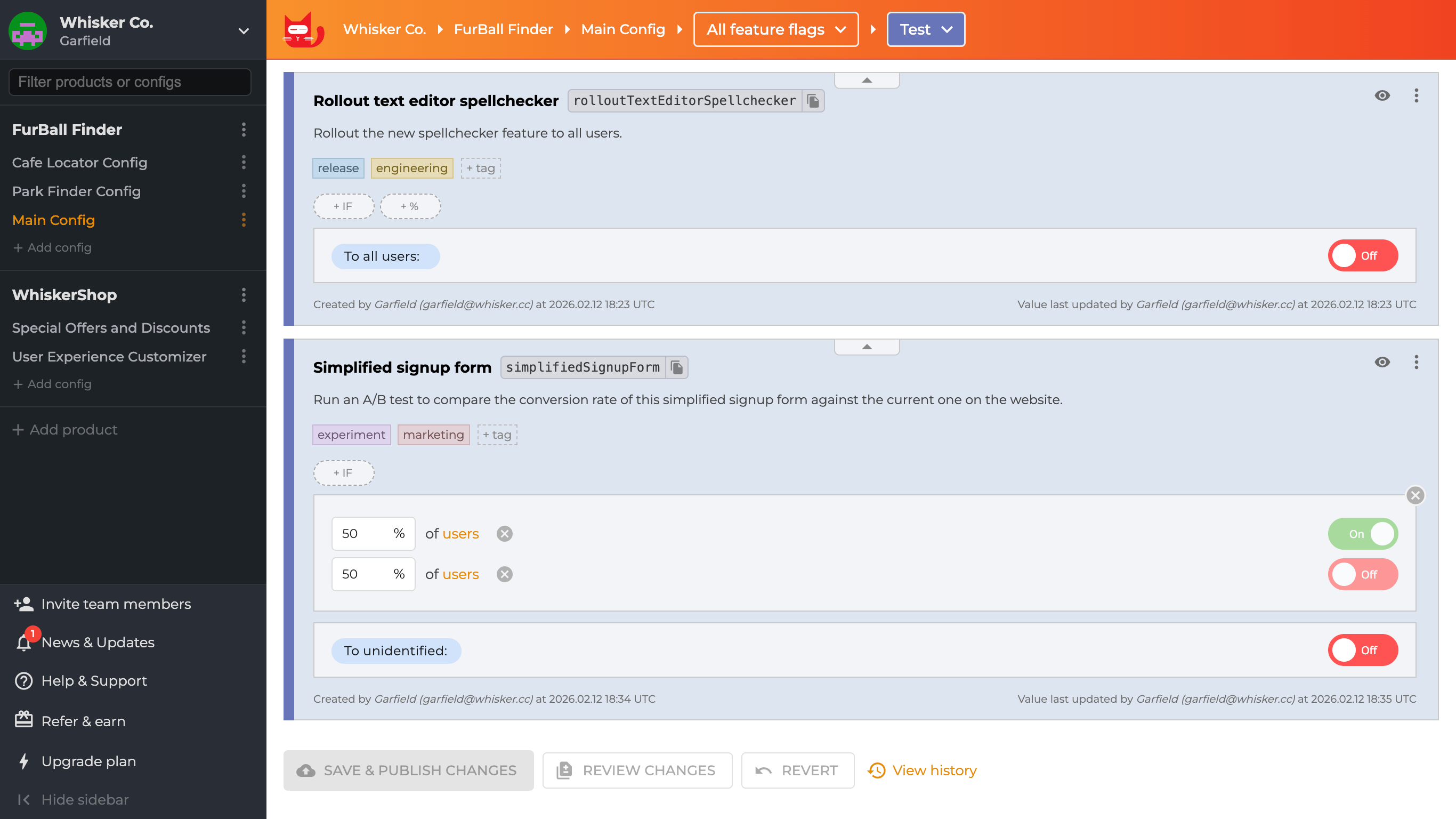
With team names and flag types as tags, you no longer need them in flag names. You can now filter feature flags by tag. While flag names are shorter, they remain verbose, but hints let you add more information.
5. Indicate Flag Longevity
If you want to indicate how long a feature flag is going to be used, you can add suffixes like "temp" and "perma" to its name. With this convention, you can easily spot a feature flag that is due for removal if you’re trying to clean up feature flags that are no longer in use. Let's see some examples:
naming structure:
teamname_flagtype_flagfunction_longevity

flag name:
sales_permission_enable_plagiarism_checker_for_user_perma

flag name:
engineering_release_rollout_text_editor_spellchecker_temp
We have a new example: a permission flag that the sales team can toggle for users who purchase the premium plagiarism checker feature. This flag will be there for as long as the app exists, so it gets "perma" in its name. The spellchecker feature is hidden behind a release flag, and since release flags are usually short-lived, the flag's name includes "temp".
Worried about "temp" flags cluttering your dashboard? You can automatically track these using Zombie Flag preferences in ConfigCat. It helps you identify stale flags before they become technical debt. Learn more here.
6. Add Flag Creation Date
You can include a flag's creation date in its name as a timestamp to make auditing flags easier. You may use dates as criteria for evaluating what flags to remove. For instance, if a feature flag is old and disabled, it's a good sign it's no longer in use. Here's an example:
naming structure:
teamname_flagtype_flagfunction_longevity_creationdate

flag name:
engineering_release_rollout_text_editor_spellchecker_temp_051123
The date in the example is in the day-month-year format, meaning it was created on the 5th of November 2023. It's no secret that date formats can be confusing, but you're less likely to mix up dates if you select one date format for your projects.
ConfigCat feature flags also store creation and update dates as metadata. Adding the date to the flag name is optional — it just makes it easier to see at a glance.

7. Choose a Consistent Case Style
Here are some common case styles used for feature flag keys:
-
Camel case - myCoolFeatureFlag
-
Kebab case - my-cool-feature-flag
-
Snake case - my_cool_feature_flag
-
Pascal case - MyCoolFeatureFlag
If you're using ConfigCat, you can choose camel, snake, or pascal case for your feature flag keys. As a bonus, you won't have to type out the name with the casing. Just give your feature flag a name, and ConfigCat will generate a key from it using the case style you chose.
In the ConfigCat dashboard, you can even set a casing style for the autogenerated feature key by going to your product > Preferences > Key generation mode.
Those are all the naming conventions we'll look at in this article. You probably understand their usefulness by now, but let's go over a few more points to see just how important they are.
Avoiding Costly Mistakes
There are quite a few things that could go wrong when teams do not use a naming convention for their feature flags:
-
Someone could accidentally turn on a feature that is not ready for production. Such a mistake can negatively impact the software's users and cause the organization financial losses.
-
Someone could turn on a retired feature because its flag name is similar to that of a new feature they want to launch. The impact of such a mistake will be worse if the retired feature conflicts with other parts of the software.
-
Someone could mistake an experiment for a feature release and turn it on for all users. The results of such an experiment will be affected, and the team might have to discard it or start over.
These problems are more likely to occur when teams lack effective feature flag management practices. Nevertheless, if feature flags are a part of your development process, you wouldn't want anything to go wrong because you named a feature flag poorly.
Conclusion
The conventions mentioned here are only guides to help you name your feature flags properly. You can tweak them as much as you need, but make sure that your feature flag names are clear enough so that those using them will understand what they do and the implications of toggling them.
And if you’re not using a dedicated feature management platform yet, you should try out ConfigCat. ConfigCat offers a forever free plan with many features for small feature flagging use cases.
You can also check out ConfigCat on Github, Facebook, X, and LinkedIn.